How often have you heard customers complain that building projects seem disorganized and out of control? It doesn’t have to be that way. While it’s true that the construction process can be chaotic, there are strategies you can use to manage your projects and time more effectively. And they don’t have to be complicated: Even the most basic scheduling system can improve efficiency.
As a builder of custom homes and additions, I use a combination of manual methods and ACT, a contact-management software. I have tried scheduling software packages in the past, but found them unnecessarily complicated for the kinds of jobs I run.
Though it’s basic, my scheduling system meets the needs of my subs because it allows them to plan their own calendars more accurately. Plus, they know that when they get to the job they’ll be able to work efficiently, because they won’t have to work around other subs. The organized, professional approach also makes life easier for my customers. A firm completion date enables them to accurately plan their move and avoid time in a hotel.
For five years I was a superintendent for a local Massachusetts builder, overseeing the construction of eight to 12 new homes per year. I often had as many as eight projects going simultaneously, and the methods described in this article worked well at that volume. I now run my own com- pany, with hopes of building two to three homes and several additions per year, and I plan to continue using the same methods.
Scheduling Tools
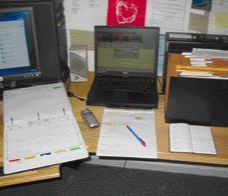
I spend about half my time in the field and half in my home office, so I need tools that allow me to move information between the site and the office. I use a computer, a cell phone, monthly calendar pages, a small datebook, a notepad, and portable project case files.
Computer. I happen to have a laptop from when I was running more jobs and needed its flexibility. With my new volume of work, and because I now have a home office, a desktop PC will suffice. I run Microsoft Word, Excel, and, most important, ACT, which is the heart of my system. I use BetterACT, an overlay application for ACT that customizes the base software for construction. For me, ACT serves as an address book, a job history, and a reminder datebook for future activities.
Cell phone. I use my cell phone to make calls while traveling from job to job; it helps me make use of time spent waiting. For example, if I am early for an appointment, I’ll get a head start on the phone calls listed on my notepad for that day.
Paper calendar. I have a three-ring binder full of monthly calendar pages for each project. These pages detail the schedule and give a brief history of the project. I carry this binder in my truck so I can always give a sub or customer an overview of the schedule.
Datebook. I carry a small datebook with my scheduled appointments in it. The datebook schedules my own time, as opposed to the project time on the monthly calendar pages. The “week at a glance” datebook could eventually be replaced with a PDA, but the book survives a mud puddle better and the number of time-specific activities I have is not that high.
Notepad. My trusty notepad lists activity details for each day, the items I need to check, and the people I have to contact. I also record notes for future events that I will ultimately enter as reminders in ACT when I return to the office.
Using the Monthly Calendars
Both planning (what’s supposed to happen) and historical information (what did happen) are written on the same monthly calendar for each project. The planning is done in pencil to allow for inevitable changes and to accommodate weather and other delays. The history is written in ink.
Historical record. For history, I record subcontractor progress, construction events (backfill, windows delivered, and so on), and any weather that affects the schedule. For example, I record the basement slab pour date because concrete bills frequently don’t contain much detail and are difficult to match to the correct project for accurate job costing. This is particularly important when more than one project is located on the same street.
Firm completion date. To create a good schedule, I rely on my own experience but also get the subs involved. From lot clearing through roof- ing, projects are tricky to schedule because of the weather. After the roof is on, however, predictability improves, and once the drywall is loaded in the house, I can typically tell my customers the day they will be able to move in.
I get a completion-date commitment from my drywall contractor, then schedule all the subs who follow. The trades who work inside are easiest to schedule because they aren’t affected by weather.
Sub buy-in. I involve the subs by getting their time estimates for specific tasks. For instance, the time it takes to complete finish carpentry varies with the level of detail and available manpower, so I ask the sub to review the plans and weigh in. In order to have the subs “buy in” to the schedule, I usually give them the maximum time they estimate they’ll need. After I assemble the schedule, I speak to each sub again to confirm his start and finish dates. The first time I work with subs, they’re typically surprised to get such specific information. They’re even more surprised when the dates actually prove to be accurate.
I usually call the subs about a week before the start date to confirm that we’re on schedule. Some subs need more reminding than others; the ones who consistently miss their start and completion dates slowly weed themselves out of the lineup.
Keeping notes. I make a note of scheduling conversations I have with subs and suppliers on the calendar with the following abbreviations:
S 3/12 = spoke with the person on March 12 LM 3/12 = left a message REM = Reminder scheduled in ACT for future action required
I don’t record the name of the person I reach unless it differs from my regular contact. If I speak to a different person, especially at a supplier, I note the name. Otherwise, I don’t put any detail on the calendar. If I need detailed notes, I’ll record the conversation in ACT. I make most of these scheduling calls from my office, so I’m in front of my computer. If a follow-up is required, I set a reminder in ACT.
I include time in the schedule for the inevitable problems that arise during every project and I rarely schedule work on the weekends. If everyone sticks to the schedule, the subs can perform at maximum efficiency because they will generally have the house to themselves on the assigned dates. Sometimes subs will show up unannounced. We try to accommodate them, but if their activity is not compatible with the scheduled sub, they have to return at another time.
Resource conflicts. By manually comparing the concurrent project calendars for available resource conflicts, I’ve been able to manage up to eight new-house construction projects simultaneously. For the typical six concurrent projects that I was managing as a construction superintendent, the system worked very well. In my new business, I plan to manage about three concurrent projects.
Cell Phone ProgrammingI’ve programmed my cell phone with more than 200 common numbers, including pauses and extensions as required. For example, when I check my voice mail, I press and hold the “1” key on my phone. The phone dials, pauses, enters my password and number, then starts to play my messages. This saves effort and distraction while driving. I have a card on my truck visor with speed-dial positions assigned to the subs. I use 2 through 9 and 11, 22, 33, 44, 55, 66, 77, 88, and 99 for the most frequently called numbers. I have other frequent numbers listed in a table. I access numbers I call occasionally by spelling the first few letters of the contact name. The main speed-dial numbers are easy to dial while in the truck. I have experimented with voice-activated dialing, but found it of limited use because you have to remember exactly how you said the name, and if your window is open it usually doesn’t work. |
Integrating Notepad, Datebook, and Computer
My notepad lists all of the activities I need to accomplish each day, grouped by project. As new items occur during the day, I write them on my pad if they need to be done that day or if a reminder for the future needs to be created in ACT. If the item needs to happen on the following day, I write it on the next page of my notepad. This second page becomes tomorrow’s first page.
As mentioned previously, I use ACT as both my address book and my main reminder for specific activities that will happen more than one day in the future. I also record in ACT important events for historical purposes: customer decisions not received in writing, attendees at meetings and decisions reached, discussions of disputes, conversations with inspectors, and so forth.
When I’m in the field, I use my datebook to schedule a new meeting. Later, when I am back at the office, I put the meeting reminder into ACT. This may not seem very efficient, but the meetings rarely require more than a few words to describe, so to write and then type them is no big deal.
Each day when I start my computer, ACT reminds me of scheduled meetings and activities. I usually schedule reminders for meetings the day before the meeting so I can record it on my notepad. As mentioned, I use my notepad only for things I need to do today and tomorrow. This limits the amount of data entry into the computer.
Beyond that time frame, I program a reminder into ACT. I usually check my computer reminders after visiting my jobs in the morning. When I arrive at the office, I get my reminders and process them or write them on my notepad. I don’t clear the activity at this point, I just clear the alarm. After a reminded activity is actually completed, I clear it.
This method works well for events that need to happen days or weeks in the future. For example, I can remind myself to call the fire department 10 days before I need a smoke-detector inspection. That way, I can get the time I want for the inspection and not face an emergency when the day comes to get the certificate of occupancy. I can also remind myself to get my truck inspected or buy my wife a birthday present. ACT presents a list of reminders that are date-appropriate. I don’t have to look at activities that are far out in the future, which helps me from getting overwhelmed by a huge list.
Case Files
All but the smallest projects get a case file. This file is tabbed with labels that match the ones I’ve set up in the computer. Up front are important sections for contracts, change orders, and job costing. Following are sections roughly mirroring the construction sequence. At the rear are meeting notes and historical prints. When I was building a larger number of projects, the complete case files remained in the office and smaller job files with information relevant to the current phase of the project traveled in my truck. As part of a larger company, I could call my office and have someone look up any information that I didn’t have with me.
For the smaller number of projects I now do, I carry these full file containers with me. This gives me access to all project documentation and allows me to file new documents immediately, before they have a chance to get lost.
Customer Decisions
At the start of a project I give customers a list of decisions they have to make, with deadlines for each. The dates are usually optimistic so that decisions get made far in advance. I schedule reminders of customer-decision dates in ACT. To follow up on decisions, I call the customers or the relevant supplier. The reminder function in ACT is also handy if clients want to discuss some aspect of the construction process at a later time. I may suggest, for example, that they upgrade the stair balustrade to oak posts and rails. The customers may not be ready to make a decision when I first bring it up, but will want to discuss it later. An ACT reminder prevents me from forgetting to discuss this detail with them.
Customers vary widely in their ability to make product selections; some need a lot of follow-up once the decision list is presented. If necessary, I’ll put reminders in ACT to call customers and remind them of upcoming decision deadlines. This is reasonably effective, especially with more complex houses. Also, if another decision-maker is involved — an architect, for instance — then these reminders become essential for keeping the project moving forward.
Ultimately, of course, if customers are unable to make the required decisions, the whole concept of scheduling becomes impossible. Such projects become long and drawn out because the next step can never be scheduled very far in advance, and, as a result, there is a lot of waiting once decisions have been made. For these customers, I have made extensive selection lists breaking down each component into smaller parts.
For example, plumbing fixtures can be broken down into those needed for the rough-in (pedestal sinks, shower stalls, and valves) and those required for the finish (styles of sinks and faucets). By breaking down decisions into very small parts, I have been able to get through these projects. Luckily, this type of project has been rare in my career.
is the owner of Oak Mountain Construction & Engineering in Wilbraham, Mass. The author wishes to acknowledge Rick Granger at Dan Roulier and Associates for teaching him the basics of the calendar-page scheduling system and case-file organization, and Dan Roulier for supporting his decision to start his own company.