You might think of ACT! as a contact manager or a task scheduler — and it does both of those things as well as or better than any other CRM (customer relations management) package on the market. But in construction, you can’t manage customers without managing tons of documents and correspondence, too. Sales letters, estimates, contracts, change orders, e-mail — being able to track “what you sent to who when” can mean the difference between resolving a disagreement and not getting paid for your work. At around $200 per user, ACT! is not only one of the best, but also one of the least expensive, document management systems around.
Document Automation
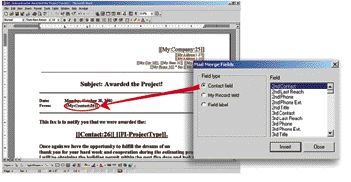
At its heart, ACT! is a database, and like every database, it captures and stores information (about the people and companies you work with — your “contacts”) in bite-sized “fields.” It ships with several dozen fields for the usual contact information (phone numbers, street address, e-mail accounts) and historical records (meetings scheduled, task lists, phone calls made). To those built-in fields you can add over 1,000 of your own to record and track any other information you like. Any of the fields in your ACT! database can then be inserted into a document and “merged” with either a single person (contact) or any group of contacts. The resulting “merge document” can then be printed or e-mailed and faxed.
Anything you can create in Word (for printing or faxing) or HTML (for e-mail) can become an automated ACT! document. Using document automation, you can:
• create sales and marketing documents that are customized for a group of contacts (for example, only prospects living in single-story homes without decks) or even customized for individual recipients
• generate proposals, contracts, change orders, requests-for-quote (RFQs), and other customer or vendor documents in seconds — imagine being able to hand a prospect a complete proposal package minutes after completing a sales call.
Library tab. New in ACT! 6 is the Library tab. Here you can mount Excel, Word, and .PDF files directly inside the ACT! interface, very handy for opening a spreadsheet or tracking product selections for a project.
Document and Incidence Tracking
It’s not enough to generate documents automatically. You also want to be able to track what you created and who you sent it to. ACT! does that under its Notes/History tab. You aren’t limited to tracking only documents created with ACT! merge fields. Any computer file — CAD drawings, spreadsheets, product cut-sheets, digital pictures, e-mail, and so forth — can be managed using ACT! and will wind up as an icon under the Notes/History tab for that contact. You can link documents using the familiar paper clip icon, or simply drag documents from Windows Explorer right into ACT!. If you use ACT! to open documents for a contact, you will no longer have to go digging through nested folders and subfolders in Windows Explorer. Any document linked in Notes/History can be opened directly by double-clicking the icon, making it a snap to find the latest change order or review the project specifications for a particular job.
E-mail tracking. ACT! will also keep track of all the e-mail you send to a client and, if you want, anything the client sends back to you. The built-in e-mail software is now good enough to use exclusively, or, if you prefer, you can link to either Outlook Express or Outlook. Like other documents, e-mail messages wind up linked in Notes/History, and you have the option to save a copy of the message inside ACT! as well.
Using Groups
One of the most powerful project and document management features in ACT! is Groups, which can be used to represent an entire project or projects. Groups can also be created by trade, by subdivision, by type of project, or any other way that makes sense for your operation. Since contacts can belong to many different groups at the same time, Groups provides an endless number of ways to analyze your operation. Once a group is created, every document and Notes/History created for that group or project will be organized in one easy-to-find place, giving you a cradle-to-grave look at your project.
Joe Stoddardis a technology consultant to the building industry and a contributing editor atThe Journal of Light Construction. You can reach him at [email protected].