I’ve written quite a bit about things I consider to be useful technology that can be taken into the field: tools like Punch List, which runs on Palm OSbased PDAs, and the various hand-held versions of scheduling software and information managers that are available for both Palm and Pocket PC. These products work well, especially if it’s just you using a PDA or Smartphone in conjunction with your own personal computer. But it’s a different story when you’re trying to outfit several project managers or salespeople, none of whom is very tech savvy. For every builder putting PDAs to work effectively, you’ll find ten who have tried and given up. After observing this for a few years, I’ve decided that it boils down to two issues: training and synchronization.
Learning and relearning. Project managers are gung-ho about having better information at their fingertips on a PDA, until they realize how much effort it takes to actually get it. Mention that they’ll be throwing their trusty clipboard or day planner away, and you and your PDAs are apt to become part of the backfill. Even if they have the desire, they probably don’t have the time to learn something new. At larger companies, I’ve found the same thing to be true of sales departments.
Synchronization. The word strikes fear in the heart of any technology manager. For those of you not yet familiar with the ritual, “hot sync” amounts to dropping your PDA into a little holder called a cradle, which is hooked up to a computer. Push a button and the computer and PDA transfer their latest information to each other so that, in theory, they are both up to date. If you have multiple project managers, lead carpenters, or salespeople using PDAs, everyone has to get good at synchronizing, and more important, they actually have to do it — every day. If just one person forgets or is unable to sync his PDA for whatever reason, you won’t have complete information about what’s going on in the field and your field people won’t know what happened at the office that day. And if you’re using something like Punch List that pushes task lists to your subs and suppliers, they’ll be in the dark as well.
Setting up multi-user synchronization also presents logistical problems. It could mean making all employees drive out of their way during morning or afternoon rush hour to come back to the office. Or it could mean setting up a complicated networking system to connect your office to job trailers, model homes, or even an employee’s home office. PDA modems, wireless cards, and Smartphones like the Treo 600 have definitely made this task easier, but you still have to establish secure communications with your office network and make provision for multiple users to access the system. Even if you can make it work, it’s less than ideal.
A Better Way
I recently stumbled onto a new tablet PC system that completely eliminates the top two PDA problems of training and synchronization, making it painless to ease technology into your field operation. I mentioned it briefly in A Builder’s Guide to Computer Hardware (5/04) but was so impressed with it, I wanted to give it a closer look. ConstructConnect by Field2Base (www.field2base.com) was created for commercial construction, but here’s a prediction: I think this technology has the potential to revolutionize how residential projects are handled as well.
ConstructConnect is a web-based service (meaning you pay a monthly rental fee to access it) that works with tablet PCs (not PDAs) running special software. You can use your own tablet PC or lease one from Field2Base. If you lease theirs, it comes equipped with both WiFi and cellular wireless cards, a built-in digital camera, and your choice of soft or hard case.
ConstructConnect is actually two applications in one: Project Communications and Forms Engine. Both make use of the tablet PC’s handwriting recognition and sketching capability, meaning that you can write and draw directly on the touch-sensitive screen with a special stylus.
Project Communications
Project Communications allows users in the field to put together what Field2Base calls a “digital envelope.” Using ConstructConnect, a project manager can snap some photos, make some notes and sketches, and mark up a drawing — just like she would on her old-fashioned clipboard. Except now, instead of running back to the office to find a printer and the FedEx guy, she just taps “Send,” and the whole thing gets delivered by electronic fax or e-mail through the air — to subs, suppliers, clients, whoever needs to see it. There is also a secure password- protected website where you can give your team access to project communications and documents.
Forms Engine
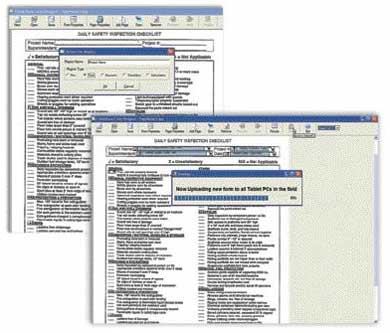
The Forms Engine is equally impressive. Back at the office, an administrator scans and uploads all your standard paper forms to the Field2Base servers using the included Form Designer application, which runs on an office PC. Change orders, purchase orders, time cards, job logs, punch lists — pretty much anything that can be scanned with an inexpensive scanner — can become part of the system.
Once tweaked and uploaded, digital forms look exactly like the paper originals, and they’re instantly available to users in the field from a simple menu on their tablet PCs. They’re simply filled in electronically using the tablet PC pen. The Forms Engine enhances the tablet PC’s built-in handwriting recognition by assigning areas of the forms as Numeric, Calculating, Checkbox, or Text. That way, the system doesn’t mistake a zero for the letter “O.” Once filled in, a digital document can be wirelessly e-mailed or faxed to an individual or group. Digital documents sent and received by the system are all logged, so it’s easy to re-create a paper trail.
What’s Different
Pen-based computing and tablets have been tried before (remember the Apple Newton?) but have never really taken off. ConstructConnect is different in two important ways. First, there are no “windows,” no “file management,” nothing to “save” or “back up,” and literally nothing new for anyone to learn.
ConstructConnect hides all the technology in the background, leaving users with the same familiar forms they were used to using on their clipboards. Second, Construct-Connect’s “connection engine” eliminates the usual PDA “HotSync” hassles, as well as the need for mobile users to constantly hunt for a way to get online. Instead, the system queues up all incoming and outgoing digital documents and messages and waits patiently until the user either drives into a cellular signal or walks into a WiFi “hot spot.” Everything is then automatically sent and received in the background. If a transmission is interrupted midstream, it’s no problem. The system automatically picks up where it left off as soon as a signal is available. All the user has to do is remember to keep the tablet PC turned on.
ConstructConnect pricing starts at $299 per user per month. That may sound like a lot until you realize what it replaces. The price includes a fully-insured lease on the tablet PC (if you lose it or run over it, it’s covered), a server hosting account, and all necessary software and server access. You also get a built-in digital camera, 802.11 wireless LAN, and Sierra wireless cellular modem cards.
The supplied tablet PC has enough horsepower to run any other Windows application and could easily be used as your primary computer. Hardware prices will no doubt fall over time, as will the price of the service, as more and more users come on board. Volume pricing is available now.
Joe Stoddardis a technology consultant to the building industry and a contributing editor toThe Journal of Light Construction. You can reach him at [email protected].