When JLC asked me to contribute to its 20th-anniversary issue, I was proud but perplexed. I’ve been out of the trenches for six years and don’t know whether the latest WiFi PDA comes with enough RAM to view a Chief Architect file, or whether contractors have figured out how to use robotic printers to lay out their floors (the idea is worth exploring).
But when I left contracting, I only hung up my tool belt — I didn’t throw away my office tools. And in the last six years, whether I’ve been directing JLC Live or managing iShow.com, those office tools have continued to serve me well. Here’s a review of the top five office tools that remain “state of the art” for all business people — even contractors.
1. Computer
There’s not much new to say about computers. They are faster, cheaper, better, and just as frustrating to use. I’m using Windows XP, because I hated Windows ME and was frustrated with Windows 2000 Professional. If I had it to do all over again, I’d still be using Windows 98. On the other hand, the Mac is still the best operating system you can buy, and I’d buy one just because they make your office look so space age.
I go online (naturally) to buy my computers at the Dell website (http://www.dell.com), but you’d be just as well off buying a Gateway or Hewlett-Packard.
If you go to the Dell website to buy a computer, you pick a standard model, add and subtract components with the click of a mouse, watch the price change, and hit the Buy button when you’re ready. Then you wait three days for it to be delivered. Someday people will buy their houses the same way. If you don’t believe me, think back to ten years ago, when it was “too complicated” to purchase a computer without the help of a consultant.
2. Fax
For quotes, cut sheets, proposals, and contracts, the fax machine is still the most popular tool in the builder’s office, and by far the best way to get quick, accurate information from suppliers. I’ve lived without a dedicated fax machine (or phone line) for the last six years by equipping my computers with WinFax Pro software (http://www.symantec.com) and a scanner for graphic input. Moving fax operations to the computer gives you all the benefits of the “paperless office” (yes, I still believe in paperless), including digital fax files that can be stored and retrieved without adding to the paper volume. If you use a laptop in remote locations, being able to fax from it is a real benefit.
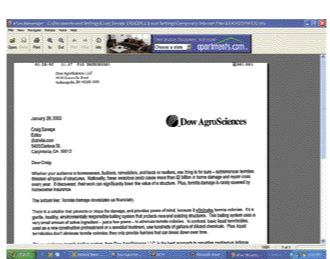
There are two fax tools that I now use with my laptop: e-fax, which is an Internet fax service, and MightyFax. When you sign up for the $9.95-a-month e-fax service (http://www.efax.com), the company assigns you your own fax telephone number. Faxes sent to that number are converted to a small graphic file, attached to an e-mail, and sent to your e-mail address. When you open the e-mail, a small program converts it to a graphic on your computer screen (see Figure 1). You can store, retrieve, print, and resend the fax from your computer. The program also lets you send broadcast faxes, and you can mark up and forward faxes. There is even an OCR (optical character recognition) feature that allows you to convert the fax image to a text file. People can send e-faxes at any time, and you can retrieve them whenever and wherever you pick up your e-mail. If $9.95 a month seems expensive, e-fax offers a free service that lets you receive faxes only. The drawback is that they assign a random area code to you, and you have to click through an advertisement to see your fax — but the price is right and you can use MightyFax to send them out.
Figure 1.e-fax is an Internet service that translates faxes into e-mail. This document was sent to the author’s e-mail address as an attachment. When opened, the fax appeared as shown.
MightyFax (RKS Software, http://www.rkssoftware.com, 800/414-4268) is a low-cost, bare-bones substitute for the frustratingly bloated and often incompatible WinFax Pro. For just $19.95, MightyFax turns your computer (Windows 95, 98, ME, NT, 2000, XP) into a send-and-receive fax machine. To get your paper documents into your computer, you’ll need a scanner. I use the Visioneer One-Touch USB Scanner, model 7100. It’s cheap ($99) and works out of the box (http://www.visioneer.com, 888/229-4172).
3. Mobile Phone
If you and your employees don’t already use mobile or cellular phones, then I’d question whether you belong in construction. Being able to get the answer “now” is invaluable in our business. Whether it’s a message from the designer, sub, or client or a communication between the office and the field, there’s no substitute for “now.”
The bad news is that in ten years, cell service has hardly improved. In spite of the “Can you hear me now” commercials, I’d never bet my company on a good connection. For those fortunate enough to have access to Nextel, communications couldn’t be better. Nextel services include standard cell phone coverage and a second “walkie-talkie” band that gives you, your crews, and your subs instant communications and unlimited connection time.
If you don’t get Nextel, try to find the carrier in your area with the best coverage. All the companies are scrambling to increase their coverage, but it’s still a guessing game. To date, those of you who travel widely have no choice but AT&T.
For those who get Nextel, there’s an innovative and useful convergence of the Internet and Nextel phone called SkyLog. SkyLog turns your voice mail into e-mail. Simply press the Push-to-Talk button on your Nextel Direct Connect phone to start talking, and SkyLog automatically records the message. As soon as SkyLog captures a voice message, it is available as a digital file for authorized users to hear, store, forward, or transcribe at your office via the Internet (Figure 2). Builders can record RFIs, change orders, and safety inspection notes; and SkyLog’s time and date stamp on all voice messages offers verification by a third party to help avoid or quickly resolve disputes. You can access and manage SkyLog messages right from skylogonline.com. SkyLog enables you to filter, sort, and group your messages any way you like. You still have to transcribe your messages into text if you want to save them as such, but once you begin to deal with digital messages, you realize that they are just as “save-able” as a text message.
Figure 2.With SkyLog, voice messages sent over the Nextel cell phone system are turned into digital files, from which they can be archived, sorted, and retrieved like any other computer file.
4. Internet
The computer is my gateway to the Internet. I have a cable modem in my office. I had DSL but had to change when my kids proved to me how much faster they could download Star Wars I with cable — 30 minutes. With that kind of always-on, broadband connection, the web becomes TV with five million channels. For builders, product and installation information is online now, but the challenge is finding it.
I use Google (http://www.google.com) to search for information. And I’ve stopped being surprised when Google puts that information at the top of the list on my first search.
In one typical day, I found myself going to the net to:
* calculate a mortgage payment —http://www.mortgage.com
* map the directions to an appointment — http://www.mapquest.com
* look up product information
* download my credit card statement into Quicken — http://www.customercare.com
* pay my Qwest long distance bill online
* read my customized version of the New York Times
* research cell phone coverage — http://www.consumerreports.org
* download the latest version of Norton Anti-Virus software — http://www.symantec.com
5. E-mail
I live and die by e-mail. If you call me; you’ll get my answering machine. But you can e-mail me at [email protected].
Craig Savage is a principal in Building Media Inc., a multimedia services company, and a former JLC columnist.