If you’re running a successful building or remodeling company, chances are you’ve developed a scheduling system that helps you keep your jobs on track. It may be as simple as a xeroxed calendar or a dry-erase board. But if it’s working, why should you consider computer scheduling? Manual whiteboards and paper lists might show you where a project is now, but computer schedulers are like a crystal ball: They show you where you’re going. You’ll be able to see what will happen to your completion dates as job conditions change, and you’ll know what to do to get back on track. Some of the systems described here also incorporate project management features — automatic notification by fax or e-mail, budget and job-cost tracking, and the ability for project managers to interact with the schedule using PDAs or wireless pagers.
K.I.S.S.
It takes a little discipline to use computerized project scheduling, but the old excuse that “it takes a college degree in project management” isn’t true. While some products have features that the typical home builder or remodeler will never need, none is more difficult to use than standard business software like Word and Excel. Greenhorn schedulers sometimes make it harder than it needs to be. Scott Dixon, a builder who created the online BuildLinks scheduler says, “The biggest problem we have is convincing builders a good project schedule doesn’t have to be a detailed personal task list for everyone on the job. If you schedule hundreds of items, you have to maintain and track hundreds of items, and that’s when builders give up.” The best approach is often to schedule the big milestones, and let project managers and lead carpenters fill in the day-to-day details using whatever methods they’re most comfortable with.
Using these computer schedulers is really no different than thinking through a project on paper. You select (or create) the activities that make up the project; put them in order; assign a length of time to each activity; plug in the resources necessary to complete each of the activities (people, materials, equipment); and finally distribute your schedule to whoever needs to see it.
Selecting a Scheduler
In this article, I’ve reviewed the schedulers in rough order from “advanced” to “simple.” Simple doesn’t mean bad. Some products, like VirtualBoss, are simple schedulers but have other project management capability that might make them more useful to some contractors than more complicated products. But in order to evaluate scheduling software, you need to understand a few key concepts and how each of the various products might handle them.
Project. For purposes of scheduling, a “project” is a unique, one-time endeavor that requires multiple tasks, completed in order, and has finite start and finish dates. Building a house is a project, while making a phone call is not — relationship management software like ACT! and Outlook lets you schedule tasks but are not project schedulers.
Task or activity. Tasks or activities are the individual building blocks of a project.
Dependencies. In construction, you often can’t start one task until another is complete. You can’t frame the house until you get the foundation done — that’s a dependency.
Critical path. String all your dependent activities together starting with the first, and you’ve created a “critical path” or “CPM” (critical path method) schedule. If you delay any one activity along the critical path by a day, every activity that comes after it is going to start one day later, and the finish date of the project is going to move back as well. Some advanced schedulers have tools to compare the original (baseline) schedule to the modified schedule.
Calendars. Even the simplest schedulers reviewed here have some facility for excluding weekends and holidays from your schedule. Advanced schedulers have the ability to overlay separate calendars for individual tasks and resources, such as “not available” days for a particular subcontractor, or limiting deliveries from a particular supplier to certain hours.
Task durations. The simple schedulers in this article allow you to schedule only in full-day increments. That could be a problem if you need to track one backhoe on four job sites on the same day. Advanced schedulers let you break down tasks to hours (useful) or even minutes (not a good idea).
Lead time and lag time. These are two of the most misunderstood concepts in project scheduling. Most of the products described here make at least some provision for lead and lag, but they might call them different things (float, overlap) or require you to enter them in different ways (numbers, dates).
“Lag” time is the amount of time you have to wait after one task is complete before you can start the next — for example, waiting for the concrete pad to cure properly before you can start wall framing. “Lead” time is the opposite — it’s the time you need in advance of an activity to set it up. Allowing six weeks to get a set of custom cabinets is an example of required lead time.
Here’s where it gets confusing: Lag times, which you would think of as negative (as in “lagging behind”), are usually expressed as positive numbers, while lead times could be negative numbers: A +2-day interval means that you have to wait two days before starting the next thing (lag), whereas a 2-day interval means that you could start two days early (lead).
Constraints. Maybe you have customers who live in Europe most of the year and will be available to lay out their whole-house audio system with your subcontractor only on two specific days in March. Or Grandma will be visiting in the third week of May, so you can’t schedule your bank closing any time that week. When those kinds of limitations (constraints) exist, they override all other aspects of your schedule. Simple schedulers might let you attach a note to an activity to indicate a constraint, whereas advanced scheduling products like Microsoft Project or Primavera SureTrak actually let you bind a schedule to the constraints you set.
Resources. Resources are the “who” or “what” that are necessary to complete a task. Simple schedulers (QuickGantt, VirtualBoss) typically allow you to assign one resource per task, or possibly a resource and a budget amount. Advanced products allow you to assign multiple resources, such as workers and materials and equipment, to be tracked along with a single activity.
Resource allocation and resource leveling. Just because you book the same electrician on eight different jobs on the same day doesn’t mean she has enough employees to actually cover the projects for you. Simple schedulers don’t take resource allocation or leveling into account at all — you’ll be on your own to keep track of who has the goods to get the jobs done and what the impact on your schedule and budget will be.
But what if you had 100 houses in production in eight different communities? Then you’d want your scheduling software to help you out. Advanced schedulers have the ability to red-flag over-allocated resources and let you analyze whether it would be more cost effective to put more masons on the job or let the project run a week longer at the other end.
Schedule “views.” All of the products in this article will show you your project information in different ways, depending on who is looking at it for what purpose. Advanced products generally offer more views than simple products. Here are the common ones:
• List view. A simple list of what needs to happen, one item after another. Simple “clipboard-friendly” lists are often the best way to distribute your schedule to your project managers and lead carpenters.
• Calendar view. Familiar to users of Outlook and ACT!, a calendar view places activities on a normal-looking calendar, especially good for presentation to your clients or for quick at-a-glance overviews of a project.
• Gantt chart. Named after early-20th-century management pioneer Henry L. Gantt, this is a special type of bar graph that shows not only start and finish dates but also how activities relate to each other. Some software products use a modified bar graph instead of a true Gantt chart.
• PERT diagrams. Program evaluation and review technique diagrams (also called network diagrams) depict scheduled activities and resources as a series of boxes that can be edited directly, a handy way to tweak your project during planning stages .
Notifications. If a week of freezing rain is making your framing run late, there may not be anything you can do to make up the time, but at least you’ll be able to notify your project team and your customer that they’ll need to start, deliver, or move in at a later date. That can mean printing, faxing, or distributing notices electronically. Some schedulers have direct e-mail and fax capability; others can save certain views and reports as web pages; and still others have full-blown real-time collaboration capability using the Internet or a wireless handheld device.
Even if the product you select is weak in built-in electronic sharing features, you can always add a .PDF (portable document format) driver such as Adobe Acrobat and distribute your schedules and task lists electronically by “printing” them to .PDF, then e-mailing the files.
Schedule and project tracking. Electronic schedulers are designed to be updated as the project progresses. All of the products in this article will automatically recalculate all future activities as you enter corrections, as well as provide some visual feedback. Simpler products might change the color of a graph or diagram to let you see what has been completed, whereas advanced schedulers allow you to save the original schedule as a “baseline,” then compare the modified schedule against that baseline.
Some specialized products, such as CDCI’s cPM, track not only time but also money, correlating the amount of work you’ve completed to the amount of money you’ve received, to give you instant feedback on your current cash situation.
The scheduler you choose will depend on the kind of work you do, the number of projects you need to track, and other software you might want to integrate with your scheduler. I’ve tried to organize the products in order from most advanced to most basic, but keep in mind that even basic schedulers may have advanced project management capability. And be aware that including a product here is by no means a “recommendation”: You’ll still need to do your homework, try out demo and evaluation versions, and determine how any of these products might fit into your overall business plan.
Joe Stoddard is a technology consultant to the building industry and a contributing editor at The Journal of Light Construction . You can reach him at [email protected].
SureTrak Project Manager 3.0
Primavera Systems, Inc.
610/667-8600
$499 for single-user license
Feature for feature, SureTrak Project Manager 3.0 is similar to Microsoft Project, minus the web-based collaboration tools. It’s nowhere near as user friendly, though, and of all the products reviewed here, SureTrak requires the most project scheduling experience to use effectively. That’s not surprising, since SureTrak is the little brother of Primavera Project Planner (P3), which is the gold standard for scheduling big commercial construction projects like roads and bridges. In fact, SureTrak can be set up to share P3 project files, ideal for contractors and subcontractors who might have one foot in the commercial construction world.
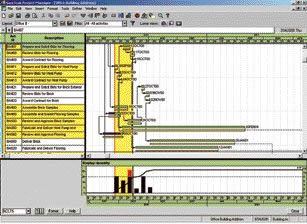
Primavera SureTrak Project Manager uses the Progress Spotlight — the yellow areas — to help the user quickly pinpoint activities and resources.
For home builders and remodelers, SureTrak 3.0 has a few interesting features. Every license includes a copy of Project KickStart, a third-party wizard that walks users through the steps of setting up a project schedule. Project KickStart can integrate with ACT! or other contact managers to pull in resources without having to retype.
SureTrak also makes use of Fragnets, predefined snippets of a schedule that include activities and the relationships between them, which you can save and reuse over and over. Progress Spotlight is a one-click interface enhancement that highlights a range of dates in order to examine activities and resources.
Like MS Project, SureTrak can save views as web pages and has the capability to e-mail schedules and reports directly to project participants.
Microsoft Project Standard 2002
Microsoft Corporation
425/882-8080
$599 for Project Standard single user
According to Microsoft, 75% of all project managers using software use Microsoft Project. It’s estimated that there are five million users worldwide, making Project the de facto standard that all other scheduling software can be measured against. It has every feature discussed here, as well as dozens more that you’ll probably never need to use.
Despite the power of Project, Microsoft has made user friendliness a priority, and the latest version is loaded with interactive help and task wizards that let even scheduling novices accomplish advanced scheduling chores. If you haven’t looked at Project for a few years, I guarantee you’ll be pleasantly surprised at how feature-rich and easy to use it has become. Project ships with some generic residential construction templates, or you can import third-party templates such as those available from 9dots software (www.9dots.com).
Project integrates easily with the rest of Microsoft Office. Contacts (resources) can be fed from Outlook, Access, or Excel. Tasks can originate in Outlook or Excel and be distributed via Outlook e-mail. Word can be used to tag notes and do mail merges. If you’re using ACT! or any other contact management software that can hook to Outlook, you can use those contact address books as well.
A “PERT” or “network view” is a handy way to see and manipulate activities and resources. Here, in Microsoft Project, you can drag and drop to reorder your schedule, or edit items directly in their PERT boxes.
One thing that distinguishes Project from the competition is its use of “resource pooling”; it maintains a common database of all your resources –subs, suppliers, equipment, employees — across multiple jobs. Resource pooling makes it easy to spot the over-committed drywaller or backhoe. Project is also strong in the project-tracking department. You can create a project baseline when you first set up a job, then compare your progress to that baseline as you go along.
In recent years, Microsoft has morphed Project from strictly a project management tool into a project collaboration tool, allowing project teams to work together in real time using the Internet. Of course, to use that feature you’ll need a copy of Microsoft Project Server ($1,499 for five users) and a full-time connection to the Internet. If you don’t want to set up your own Project server, you can rent space on someone else’s. MSProjecthosting.com (www.msprojecthosting.com) offers service for $50 a month plus $20 a month per user who connects to the account. If you don’t need a fully interactive collaboration site, you can share Project data by publishing static data (a snapshot in time) to any web server with Microsoft Office extensions installed, or you can save list views in Excel or Access.
Microsoft Project’s flexible “views” let you put a lot of information on one screen. Above are a project list view on the left, an interactive Gantt chart on the right, and a resource leveling view on the bottom.
One thing missing from MS Project is support for handheld devices. Project 2000 (but not 2002) can be synchronized with PalmOS PDAs using a third-party solution called Project@Hand (www.natara.com), but surprisingly, there is no native support at all for Microsoft’s Pocket PC platform. According to the company, Microsoft has made the decision to instead pursue tablet PCs for its mobile users of Project.
(Note: For this article, we reviewed Project 2002; by the time you read this, Project 2003 will be available.)
FastTrack Schedule 8.0
AEC Software, Inc.
800/346-9413
$299 (PalmOS add $99)
At $299, FastTrack is only a few bucks more than basic schedulers, but it has big-league features on par with Microsoft Project and SureTrak. What’s more, it’s one of the easiest schedulers to use and the only product with full support for the Macintosh platform. For another $99, you can add a PalmOS version for your PDA, which will synchronize with the desktop version or work as a stand-alone.
FastTrack has three basic views: Calendar, Schedule, and Resource. The Schedule view has both a task list and a Gantt chart. If you don’t like the existing views, no problem: A distinguishing feature of this scheduler is its fully customizable interface. You can add and move columns, rows, and other elements to create and save an endless variety of views. FastTrack has Excel-like calculating capability to define and track budgets. Resources are fully definable, and each can be controlled with its own calendar.
Like other advanced scheduling products, FastTrack allows you to set different work calendars for each resource in your schedule.
FastTrack can schedule and analyze resources across multiple projects, a good feature for production home builders. Groups of tasks can be rolled up into milestones on the schedule or saved as “FastSteps” to be reused over and over.
FastSteps is a built-in scripting capability that allows you to automate repetitive scheduling tasks or reports by grouping together a series of commands. For example, a FastStep could be created to generate and print a report of all unfinished activities every time you update a schedule.
Builders running lots of simultaneous jobs will like FastTrack Schedule’s one-screen views. The user-friendly interface is fully customizable.
Finally, if you’re migrating from whiteboards, you’ll appreciate the “wall chart” printing feature that will tile your schedule on standard-size paper.