Take a look at the discussions on JLC Online’s computer solutions forum and you’ll find the perennial CAD thread called something like “Chief vs. SoftPlan vs. VectorWorks vs. Cadsoft vs. AutoCAD vs. whatever else.” By now, everyone should realize that if you’re willing to spend a grand or more, you can purchase a license to a full-featured, professional, architectural-specific 2-D/3-D CAD system.
But what if you do design work only occasionally, or need only basic drafting capability? Simple room additions, decks, built-ins, and the like still require thorough and accurate design, but do they warrant purchasing a high-end CAD system? And what about the claims of “instant material lists”— can you trust any of them?
In the January 2001 issue of JLC, I took a look at several low-cost and no-cost design systems and concluded that if you were willing to learn how to use multiple products — one for 2-D drafting, another for 3-D visualization — and then endure some annoying work-arounds, you could produce acceptable client work with software costing a few hundred bucks or less.
This time, I wanted to skip the work-arounds and find options that would provide a decent end-to-end design solution on a reasonable budget. I originally set the bar at around $500, but quickly found that I was a couple of hundred bucks low. However, I was able to find capable 2-D/3-D packages for under a grand.
I focused on the three general functions a JLC reader might need: 3-D presentations, working drawings, and CAD-assisted estimating. With those functional areas in mind, I spent the last few months soliciting, installing, and testing dozens of CAD products.
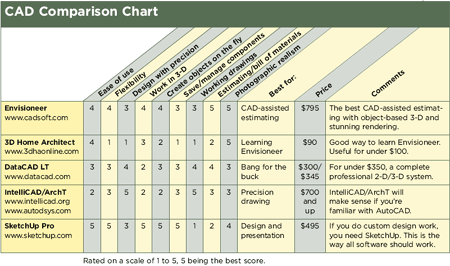
The vast majority were too generic or too simplistic, or required a rocket scientist to figure them out. So for this roundup, I settled on four product families: Cadsoft’s Envisioneer and little brother 3D Home Architect, DataCAD LT 11, IntelliCAD plus ArchT, and the wild card — SketchUp Pro. Not all of them satisfy every one of my three functional criteria, but they are all worthy additions to your digital toolbox if you accept their limitations.
3-D Presentations
I wanted the ability to quickly and accurately create a 3-D model of a project for sales presentations or to clarify construction details. Back in 2001, I suggested using an image editor like Paint Shop Pro or Photoshop to patch up whatever the low-cost CAD couldn’t handle, and that is still an option. But this time around I was looking in particular for something I could use in real time while sitting face-to-face with clients, with no fudging.
SKETCHUP
DATACAD
SketchUp is unique in 3-D design because you draw directly in 3-D space, the same way an artist would sketch on paper. Most 2-D/3-D CAD is more like DataCAD; it forces you to work in a 2-D view, and then generate 3-D in a separate window.
It’s not critical that the 3-D model be accurate to the inch (unless you intend to extract your bill of materials or “slice” your 2-D drawings from it), but the software does need to be flexible enough to draw whatever it is you’re planning to build. The ability to create a custom-turned bun foot on a kitchen island, for instance, will be a whole lot more important than whether you get 2,500 different 3-D shrubs or 800 carpet patterns, as you do with consumer CAD products.
Can you add exposed rafter tails, or are you stuck with a flat soffit? What about an oddball-sized gable dormer with a different pitch than any other roof on the building, a trapezoidal window above the plate line, or a complicated built-in under the stairs?
Of the products reviewed here, SketchUp is by far the king of working directly in 3-D space. 3D Home Architect and Envisioneer both let you add and edit items in 3-D (initial drawing is done in a 2-D floor-plan window), while DataCAD LT and IntelliCAD/ArchT are more old-school: You do most of your drafting in a 2-D window and have to load a 3-D generator to see the results.
Working Drawings
Although 3-D may rule for presentations, the job site still runs on flat drawings. Unlike generic 2-D-only CAD, builder-specific 2-D/3-D should give you a running start on your working drawings by allowing you to create automatic elevations and building sections from your 3-D model, and then use built-in 2-D CAD tools and notes to dress them up for construction drawings.
Good working drawings — like this one produced in IntelliCAD — require the flexibility to determine how dimensions appear, manage line weights and layer visibility, and print multiple scales on the same sheet.
All of the products reviewed except SketchUp and 3D Home Architect have precision 2-D capability, and even SketchUp can give you rough elevations — as well as sections and floor plans — by simply slicing the 3-D model. 3D Home Architect has no 2-D drafting capability at all, making it practically worthless for working drawings, but it does allow you to add dimensions to floor plans and notes to various views for presentations.
Conflict checking. We’ve all had that set of plans where the ductwork runs through the skylights because somebody didn’t bother to check drawings for consistency. Even if you’re starting from a very complete 3-D model, these errors can still occur with 2-D/3-D CAD unless you can overlay your floor plans in some way to check for conflicts. DataCAD LT, IntelliCAD/ArchT, and Envisioneer all do well in this regard.
SketchUp sidesteps the problem: You draw the entire model in 3-D and then slice it to create the flat drawings — which, if you’ve drawn a complete model, makes conflicts more obvious.
Dimension options. At a bare minimum, 2-D CAD features should give you the ability to draw quickly with precision and apply “associative dimensions,” which update automatically when you move something. You also should be able to apply extension lines and dimensions from both the center of objects (for window placement in a wall, for example) and the edges of an item (for dimensioning a building to face of stud).
There should be a way to save reusable 2-D symbols (or “blocks”) so you don’t have to reinvent the wheel with every drawing. Every product in this review has some kind of symbol navigator to make it easy to add your saved items to a drawing.
And finally, for bonus points, you should be able to print multiple drawings at different scales on the same sheet, say a floor plan at 1/4 inch = 1 foot and a cabinet detail at 1/2 inch = 1 foot. Of the products in this round-up, only the IntelliCAD/ArchT bundle has that capability.
CAD-Assisted Estimating
Everyone wants the ability to generate an accurate bill of materials based on CAD drawings, something every $30 “design” package at the big-box office supply claims to do. But for this feature to be useful to a contractor (and not just a toy for a homeowner), five things have to be true:
• The objects on the drawing must represent reality (the wall you’re drawing must have all the attributes of the wall you will actually build).
• The software must be able to accurately count and report what’s directly on the drawings (the LF of wall, or the number and type of shower units or exterior doors).
• The software must be able to calculate, or “extrapolate,” related materials to your specifications, based on known quantities of other items. You might use more or less rebar in your foundation than the next guy.
• You have to be able to define those items. “Tubes Construction Adhesive” and “Boxes Gun Nails” don’t mean a thing unless you know they’re quart tubes and 5,000-fastener boxes.
• Finally, you need to be able to get a bill-of-materials (BOM) report out to Excel or some other estimating software.
None of the consumer-related CAD programs I tested, including 3-D Home Architect, could fulfill all of those requirements. They could count but not calculate; or they could calculate but wouldn’t allow me to change what was being calculated — for example, the materials that I wanted to use in a 2×6 wall.
Envisioneer’s configurable materials database makes it one of the best CAD-assisted estimating products available today at any price.
Like more conventional 2-D CAD programs, SketchUp Pro can count and report on the number and type of components in the model, but since you’re not defining objects for walls, framing, and so forth, a basic window or fixture schedule will be the best you can do, and that will require programming.
IntelliCAD/ArchT creates the lists and counts, but requires third-party estimating software (or a good programmer) to actually get the information out into a usable report.
Of the packages in this roundup, only one — Envisioneer — shines in the estimating realm, with a fully configurable materials database and complete flexibility about how those items take off from the model.
Joe Stoddardis a technology consultant to the building industry and moderator of the JLC Online computer solutions forum. You can reach him at www.mountainconsulting.com.