What do you get when you combine 90,000+ attendees from 70 countries with a million square feet of exhibit space and two hundred conference sessions, including an all-technology show-within-a-show (TecHomeExpo) that dwarfs most other stand-alone trade shows? The International Builders’ Show (IBS), of course. This show is so big, there is no way to see everything in four days, and there isn’t space here to talk about everything I did see… so my apologies in advance to anyone I missed.
Digital Power Tools
Like it or not, for today’s busy builder, job-site technology like PDAs (personal digital assistants), next-generation cell phones, and feet-inch calculators is becoming just as important as screw guns and miter saws. Toolmaker Bosch (http://www.boschtools.com) “gets it” and used the IBS to roll out its first Digital Power Tool, Bosch’s version of the excellent Punch List resource tracking program for the Palm OS (Computer Solutions, 5/98). Just as it has with its conventional tools, Bosch is approaching the digital realm thoughtfully and methodically. The company has formed an advisory panel consisting of contractors, tech consultants, and other industry heavy-hitters who are committed to keeping the new product line useful and real. Prices start at $299.
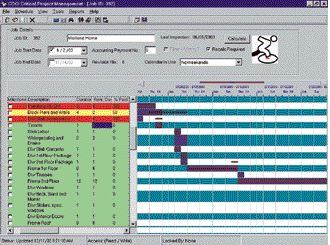
CDCI’s new scheduler, cPM (critical project management) is one of the best synergies of desktop PC and hand-held computer that I’ve seen (see Figure 1).
Figure 1.cPM is an easy-to-use scheduler that translates between desktop PC and hand-held device with no problem.
Unlike Microsoft Project and other complicated generic schedulers, cPM (http://www.cdci.com) is geared specifically for construction and can be learned quickly by just about anyone. Only three fields of information — Activity, Duration, and Sequence — are required to set up very complete project schedules. The program does all the heavy lifting and displays the schedule information in a way that will make sense to builders and remodelers. cPM translates perfectly to hand-held devices, both Palm OS and PocketPC, letting your production people take their schedules into the field without breaking a sweat. Prices start at $500 to purchase, $100 to rent.
AI Phone Home
If you’re into design-build but not into all the hassles of getting the project budget and client expectations in line with reality, then Trelligence Affinity 2.0 for Residential (http://www.trelligence.com) is going to make some light bulbs come on for you. Affinity is not a CAD program but rather an artificial intelligence (AI) engine that will serve as an ongoing reality check for you and your clients. Starting out as a wish list/checklist that you control, Affinity lets you capture client project requirements (kitchen to the left of the family room, Jack-and-Jill bathroom, and so forth). Next, it lets you conform the dream project to the budget reality and keep tabs on the money throughout the job (Figure 2).
Figure 2.One of the first artificial intelligence tools to hit the construction market, Affinity for Residential can help you define design-build projects and then keep them on track.
Finally, Affinity creates a “smart” bubble diagram of all the rooms or project features, which you can drag around to create a preliminary design. If your room or feature arrangement violates any of the project “rules,” the diagram changes color to let you know. Once everything is as it should be, you can pull the bubble diagram into your favorite CAD program for tweaking into a final design, and export reports to Excel for continued bean counting. Seasoned design-builders I showed the system to were blown away, making comments like, “I’ve been wishing someone would come up with this for years….” Affinity is a lot harder to describe than to appreciate once you see it, so check it out. Prices start at $599.
Speaking of CAD, big news for JLC readers is the release of SoftPlan 12 (http://www.softplan.com). SoftPlan has always been a great residential design program, but its proprietary drawing format has made it impractical for anyone needing to talk to the AutoCAD (.dwg) world. Version 12 changes all that with a fully functional .dwg file translator. To check it out, I opened a sample project in SoftPlan 12 and imported it into AutoCAD LT without a hitch (Figure 3).
Figure 3.SoftPlan 12 (back) can now exchange drawing data in the AutoCAD .dwg format (front).
Another new tool lets you convert shapes on imported drawings into SoftPlan walls, giving you a big jump on converting “dumb” flat drawings into “smart” SoftPlan models. Other version 12 features SoftPlan users have been screaming for include auto-dimensioning, multiple-undo/redo, dynamic pan/zoom, terrain modeling, a better stair modeler, and the ability to save “walk-through” animations in 3D — to name just a few of the 12 pages of enhancements. New users will pay $2,985 for SoftPlan; upgrades from previous versions start at $595.
Two New Bricks in the Wall
Wise Brick (http://www.wisebrick.com) is a newcomer to the “integrated” construction software market. Aimed primarily at small to midsize companies, Wise Brick uses either a Microsoft Access or big brother Microsoft SQL database to create accounting, job costing, payroll, contract management, inventory management, and scheduling modules (among others). Prices start at $4,999 for three users, with annual maintenance starting around $750 for payroll updates.
Another new kid on the block, Allentium Software (http://www.buildintheblack.com), debuted version 1.0 of Build in the Black, yet another integrated application aimed at smaller construction companies. Like Wise Brick, Build in the Black includes specifications, estimating, scheduling, accounting, quotes, bids, and vendor-customer management and hopes to convert current QuickBooks users to something more construction specific. Unlike Wise Brick, which sports a familiar user interface, Build in the Black relies on a simple tree-style menu system and Spartan work area (Figure 4). Prices start at $595 for version 1, soon to be replaced with a fuller-featured version 2, according to company representatives.
Figure 4.Build in the Black uses an unconventional two-pane interface. Program features are in a drop-down tree on the left and load in the window on the right.
Old Dogs, New Tricks
BuildWorks (http://www.synapsesoftware.com) has been around (as GCWorks) for 12 years, but the new version 3.0 sports some impressive new features. Home builderturnedsoftware developer Jim Erwin has leveraged how Microsoft Office and Intuit QuickBooks work together, nearly eliminating redundant data entry. For example, customers and vendors entered in one of the many BuildWorks estimators flow directly into QuickBooks, and job-cost information from QuickBooks comes back to automatically update the BuildWorks job analysis and project schedules.
Especially interesting in the new version are PDA and web tools. BuildWorks Online pushes all your project documents and digital photos up to a password-protected website with just a couple of mouse clicks (Figure 5).
Figure 5.BuildWorks Online provides easy-to-use web tools such as this online photo gallery to keep your clients and project team on the same page.
Each job folder gets its own passwords, so you can limit who sees what. Unlike complicated and expensive “web collaboration services” that few can get their brains around, BuildWorks Online is simple, cheap, and gets the job done. BuildWorks starts at $1,000 for the “basic” version for an unlimited number of users (QuickBooks and Office not included). The online service starts at around $20 per month, depending on how much online storage space you need.
Another favorite of JLC readers, CGR remodelerturned time management guru Norm Seff was on hand with his latest version of BetterACT! (http://www.9dots.com), a suite of enhancements that transform generic ACT!, a contact management program, into a powerful cradle-to-grave relationship manager for builders and remodelers (Computer Solutions, 2/99). With BetterACT!, a contractor can generate scores of documents, letters, and reports specific to a project with just a couple of mouse clicks (Figure 6).
Figure 6.BetterACT! can become mission control for builders and remodelers, managing both project documents and customer relations.
Then, by attaching project documents directly to client and project records, every scrap of information about a job can be retrieved at will, no matter where it’s stored on your computer. New features include better interactivity with QuickBooks Pro, Excel, Word, and Microsoft Project and a greatly improved automatic installer. BetterACT! is $299 with multiseat discounts available.
Joe Stoddard is a technology consultant to the building industry and a contributing editor at The Journal of Light Construction. You can reach him at [email protected].