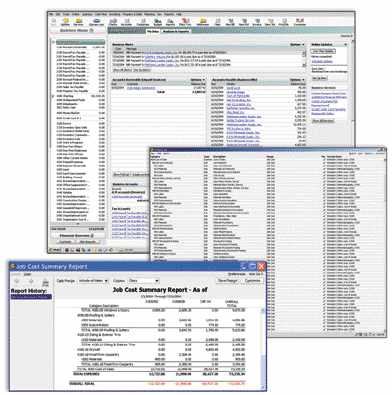
Compared with Timberline or Great Plains, Intuit’s QuickBooks Pro is a simple entry-level accounting system. But “simple” is a relative term. For a small contractor who just needs a way to replace the checkbook in his back pocket, even QuickBooks can be overwhelming. For such a builder, Synapse Software (www.synapsesoftware.com) has gone back to the future and released a new member of its BuildWorks product line that might be exactly what the doctor ordered: BuildWorks Basic ($395) uses Intuit’s Quicken Premier Home & Business instead of QuickBooks Pro for accounting and includes several other critical management tools in a value-priced package. And for all of you who are sick and tired of wasting time “estimating” jobs for tire-kickers, Synapse also has released its unique BuildWorks Quick Quote estimator as a stand-alone product ($229). Add them together and you have a solid financial management system that will grow with you.
BuildWorks Basics
BuildWorks is not a single piece of software. Instead, it is a suite of tools, built with Microsoft Office and Intuit’s accounting products, that work together to create a complete construction management system, and it has evolved over the years into several editions with varying capabilities. The Pro editions of BuildWorks take QuickBooks and Office integration just about as far as it can go, with dozens of business management tools: estimating, purchase orders, change orders, job costing, scheduling, document templates, PDA tools, online components, and more — but with a price tag and complexity to match.
Most people forget that BuildWorks started life in 1993 as GC/Works; it consisted of a Quicken (not QuickBooks) accounting file and a handful of management templates built in ClarisWorks, not Microsoft Office (Word and Excel were the new kids on the block back then). It was a simple but effective system for small contractors. The new BuildWorks Basic is really a re-release of the original GC/Works accounting system, with some interesting modern twists, including the following:
- a fully configured Quicken company file, complete with a chart of accounts, memorized transactions, and customized reports;
- the basic version of the BuildWorks Navigator, which is used to organize and launch various project documents;
- the BuildWorks Jobs file, which stores and organizes project information and provides some “at a glance” analysis of your financial health;
- two estimating and job management templates: the Mini Estimate, which is geared toward remodelers, and the Basic Estimate, a versatile line-item estimator, both of which have a proposal form and “pro forma” budget sheets (the Basic Estimate also includes a form to log payments and graphical charts to monitor budget vs. actual job costs);
- the BuildWorks Components file, which is really the estimating cost database for the estimating templates;
- a two-part change-order template with a printable request form that can be completed by the client for each change, plus a pricing worksheet that can be used to deliver a selling price for the change;
- tools for creating pdf (portable document format) versions of any BuildWorks file, which can be e-mailed or faxed to anyone in your Outlook address book;
- a printed accounting guide, written by CPA Jim Silverman, which explains exactly how to use the Quicken accounting file to run a small construction business.
Using BuildWorks
BuildWorks Basic follows the same working procedures as the Pro versions: A prospect or customer is entered in the Jobs file, which automatically sets up a folder structure inside My Documents to organize all the BuildWorks documents for that project. An estimate is then started in one of the Excel-based estimators, which in turn establishes job budgets that later can be used for job-costing comparisons. It’s not rocket science, but BuildWorks imposes a level of computer organization that would take a lot of effort to build from scratch.
Job costing. BuildWorks tracks 25 predefined job-cost categories. These are used to produce budget-vs.-actual reports in the accounting system and to log job costs in the Jobs file. You shouldn’t change the name or order of the main categories — an aspect of BuildWorks that has drawn complaints. Still, it’s much better to get accurate job-cost information in 25 key areas than to have half-baked information in 125.
BuildWorks follows a “management by exception” philosophy, which basically means if it ain’t broke, don’t fix it: If you’re watching 25 key job-cost areas and 24 are mostly within budget, don’t worry about them. This gives you the freedom to concentrate on the one or two categories that might be spinning out of control in time to actually affect the outcome of the job.
Conforming templates. One key to success with BuildWorks is taking the time to tweak (or “conform”) each of the Excel-based estimating templates to reflect specific types of work. So instead of having to struggle with a blank estimating worksheet for every job, there is an existing template — already created by you — for “kitchen,” “whole-house,” “basement remodel,” and so forth. As with any estimating system, it does take time and effort to get these items set up for best efficiency, but the raw tools are all there to help you.
QuickBooks vs. Quicken
Because BuildWorks Basic uses Quicken Premier Home & Business — unlike the more expensive BuildWorks editions, which use QuickBooks Pro — the accounting is simple and straightforward, but it creates some limitations.
Pro editions of BuildWorks generate an automatic job budget import file and synchronize with QuickBooks automatically, greatly reducing manual data entry. Unfortunately, Quicken lacks that capability, so you are forced to manually update both your accounting file and the BuildWorks Jobs file by rekeying numbers in the correct location.
Also, I found out the hard way that Quicken 2004 and 2005 do not like each other. Upgrade installations failed on every machine I tried, and Intuit’s tech support was no help whatsoever. This is not Synapse Software’s fault, but it’s still a gotcha that you need to be aware of if you’re already using Quicken accounting and want to upgrade to the latest Home & Business version.
The solution is to completely uninstall Quicken 2004 and install 2005 from scratch.
Upgrading
One nice advantage of using BuildWorks Basic is that you have a built-in upgrade path to BuildWorks Lite ($695), the QuickBooks Pro version of Basic, and later to the full-blown versions of BuildWorks ($1,195 to $2,995), if you need them. Accounting migration services are available from Synapse Software.
BuildWorks Basic is $395 direct. The price does not include Quicken Premier Home & Business ($80) or Microsoft Office 2000 or later. Many new computer manufacturers are now including Office 2003 Basic, which includes Word, Excel, and Outlook, for under $50 with a new computer.
So, for just a little more than the price of one licensed copy of QuickBooks Premier — which you would have to set up completely from scratch — you can have the beginnings of an industry-specific financial management system that will grow with you.
Joe Stoddardis a JLC contributing editor and a technology consultant to the building industry. You can reach him at www.mountainconsulting.com