Our company has been in business in the mid-peninsula region of the San Francisco Bay area for 20 years. Our primary focus is on high-end kitchen and bath remodeling, but we’ve also recently begun installing home theaters for our high-end clients. We have five employees and regularly work with a half-dozen or so trusted subs.
We usually have five jobs in varying stages of completion at any given time, and as the estimator for our company, I spend a lot of time going back and forth between jobs and coordinating subs and suppliers. To make my job easier, I’ve used my interest in technology to improve my business efficiency. I’ve outfitted my pickup truck with an assortment of electronic devices that allow me to perform many routine office tasks while I’m still in the field.
My main tools for this are a truck-mounted cell phone, mobile hand-held two-way radio/cell phones, a laptop computer and printer, a personal digital assistant (PDA), and a mobile global positioning system, or GPS. I spend two or three hours a day behind the wheel, and having the ability to take care of important calls and e-mails as they come in not only increases my efficiency, but it also improves our relationships with customers. And most important, it gives me more time for a life apart from work. Instead of spending an extra hour returning calls and e-mails and printing out paperwork at the end of the day, I can go home and spend that time with my family.
A Truck With Power
My truck is a four-door 1999 Ford F-350 diesel (see Figure 1). The two rear doors make it easy to move sales props and samples around as well as to take customers and prospects on site tours. I often drive prospective clients to existing projects, so they can see our work.
Figure 1.With its ladder rack, locking toolbox, and retractable bed cover, the author’s work truck resembles any other well-appointed contractor’s vehicle. On the inside, however, it contains several useful innovations, including a custom computer table, a mobile printer, and two cell phones.
AC to go. One of the first modifications I made to the truck was to have my mechanic install a 600-watt inverter. This electronic “black box” converts the DC power that’s produced by the truck’s alternator and stored in the battery into conventional AC power. The inverter, which is about the size of a thick hardcover novel, is mounted on the floor under the passenger seat and connected to the truck battery with concealed cables. Three standard 120-volt receptacles on the front of the unit give me a place to plug in my laptop computer and printer (Figure 2.)
Figure 2.A 600-watt inverter mounted under the passenger seat converts the truck’s 12-volt DC output into 120 AC for operating electronics, charging NiCad batteries, and occasionally powering drop lights and low-amperage power tools.
Including labor, this cost about $400, and it brought some important benefits. One important consideration is that it makes the cab of the truck much tidier. Before I got the inverter, I had a number of devices plugged into outlet doublers in the cigarette-lighter plugs on the dashboard. This worked, but the cords were always getting in the way, and it made the dashboard look like the back of a stereo receiver. With the power receptacles under the seat, it’s a lot easier to keep cords neatly coiled and out of the way.
Having AC power available at the truck is also handy for other uses. Although the 600-watt rating means that it’s too small to power a circular saw, I have used it to power portable work lights, and it could easily run a drill or similar small tools. It also allows me to recharge cordless-tool battery packs while on the go.
Managing Phone Calls
I handle most of my on-the-road calls with a Nokia 600 cell phone that’s hardwired to the truck’s battery power. Because it’s voice-activated on my end by way of a small microphone that mounts on the sun visor on the driver’s side, I don’t have to take my hands off the wheel to make a call or carry on a conversation.
The batch system. The cell number to the truck phone is the one I give out to customers, vendors, and subs. If I’m in the truck when the call comes in, I can pick up right away. Otherwise, the caller leaves a message, and I return the call on my way to the next job site. This system allows me to deal with the day’s incoming calls in four or five batches throughout the day, rather than all at once in the late afternoon or evening.
Responding to messages this way saves a lot of time, because I don’t have to interrupt work or a meeting to take a call. I’m convinced that it also gives me a leg up on many of my competitors. According to the speaker at a seminar I recently attended, the industry-wide average for returning phone calls is two and a half days. With the batch system, I return calls within a few hours at most.
Building trust with customers begins while they are still prospects, and returning calls promptly shows that I’m interested and will be there when needed.
Walkie-talkies. When I’m away from the truck, I carry a combination cell phone and walkie-talkie. My office staff and family members have that number, so they can reach me immediately if necessary, but I don’t give it to subs or clients.
Our employees and even some of our subs carry the same Nextel i700 Plus cell phones, which can be converted from cell-phone mode to two-way radio mode by clicking a switch. There’s no charge to make a call in walkie-talkie mode — just a flat monthly fee — and that reduces our overhead by hundreds of dollars a month. The walkie-talkies have a range of over 50 miles in flat areas, but when we’re working in the hills, where many of our affluent clients have homes, reception can be a problem. If the terrain prevents us from making a call in walkie-talkie mode, we simply switch over to cell phone and make the call that way.
Traveling Computer and Printer
Like most builders today, I rely heavily on my laptop computer. Despite the name, though, laptop computers don’t really work very well on your lap. They tend to slide around when used that way, making it difficult to view the screen and enter data efficiently.
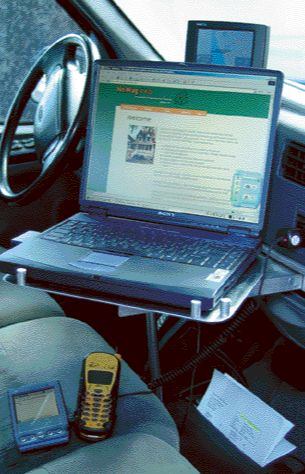
A mobile computer mount. My solution to that problem was to install a computer table in the dash of the truck, between the driver and passenger seats (Figure 3). The table was designed and built by an old friend, Dave Vargas, who is a fine machinist.
Figure 3.A computer table made from aluminum angle, bar stock, and 3/16-inch plate is mounted in the dashboard cupholder slot and receives additional support from an aluminum rod that rests on the floor. The table can be locked to left, right, or center, making the author’s laptop computer accessible from the passenger seat or — when the truck is parked — from the driver’s seat.
The strong aluminum table fits precisely into the empty slot left in the dash after the cupholder is removed. (The cupholder is designed to be removable, so that doesn’t require any alteration or damage to the dashboard.) A built-in lazy susan bearing from a cabinet supplier allows the table to swivel to the left or right, making it easy to use from either driver or passenger seat. It can be locked in either position or in the center.
This not only works well, it also attracts attention wherever I go. My tech-savvy clients always remark on it, and when I took my truck to the local Ford dealership recently, the entire service department came over and crowded around it. If this were manufactured commercially, I’m sure it would be a hot-selling item.
[To see a mechanical drawing of the author’s aluminum computer mount, click here.]
Paper to go. Cell phones and wireless e-mail are great, but plenty of job-site functions demand some sort of paper. For example, I often need to print out specs, drawings, or other materials I receive by e-mail so I can pass them along to subs or clients. It’s also much easier to print change orders in the field and get the necessary signature on the spot than it is to haul the right paperwork from the office.
I handle job-site paperwork with a basic black-and-white Canon Bubble Jet printer, which costs about $150. It’s attached to the carpet between the driver and passenger seats (under the computer table) with two strips of self-sticking Velcro tape. The “hook” half of each strip, which is stuck to the base of the printer, mates firmly to the pile of the carpet, with no need for the corresponding “loop” strip.
Having the printer available lets me make a hard copy of anything on my hard drive at a moment’s notice. If customers question an item on the bill, for example, I can print out a copy of the e-mail from them that authorized it. As a result, we almost never find ourselves in confrontation mode with our clients.
Digital Photos
My Sony Vaio computer lives in the truck, but I carry a small PDA for wireless e-mail, scheduling appointments, and organizing contacts.
My Handspring Prism PDA cost about $200, and for $100 more, I added a module that lets me use it as a digital camera. I always take digital photos on my initial job-site walk-through so I don’t have to rely on my memory for specifics. This lets me develop a start-to-finish pictorial record of each project, which flows into my laptop through a cable and USB connector.
Most of my site superintendents also carry PDAs, so we can easily exchange information, including photos. If a project manager is running multiple jobs, I can often clear up a question by sending or receiving a picture, rather than taking the time to drive to the site.
In some cases, we send photos directly to a client. We did one job for a client who was traveling in Spain. When I received an e-mail from the superintendent at the site saying that he’d found some hidden rot, I had him take a digital photo and e-mail it to me immediately. I issued a change order in the truck and e-mailed that along with the digital photo to the homeowner in Spain. The change order was approved within hours.
Without the digital camera and e-mail capabilities in the truck, that could have taken several days. Instead, the project remained on track and actually finished ahead of schedule.
Finding the Way With GPS
Because I spend so much time driving to the unfamiliar addresses of new clients and prospects, I’m a firm believer in GPS, which uses satellite data to provide detailed point-to-point directions. My dash-mounted unit is made by Blaupunkt. Although it cost about $1,200 when I bought it several years ago (they’ve come way down in price since), it’s paid for itself by cutting back on the number of nonbillable hours I used to spend looking at maps and making wrong turns.
The unit is easy to use: You simply punch in an address — or call up a saved address already in the system — and the GPS draws on a sort of electronic road atlas to talk you through the route. (You buy a CD of information for your area of the country, but once it’s loaded into the system, there’s no additional charge to use it. There’s also no monthly charge for the GPS once it’s paid for, because it uses government satellites to function.)
As you approach your exit on the freeway, a computer-generated voice warns you several times that you’re getting close. Once you make the turn, it tells you which way to go at the end of the ramp. The unit is said to accurately sense your location within a range of about 8 feet. My favorite moment is always when I pull into the driveway of the new address and stop the truck. The GPS speaks up and says, “You have reached your des-tin-a-tion.”
Tim Hmelar is founder and president of Tim and Frank Hmelar Construction, a kitchen, bath, and home theater remodeling business in the San Francisco Bay area.