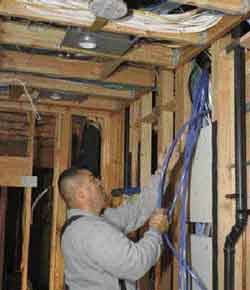
Homeowners who use computers, MP3 players, digital cameras, satellite or cable television, and other electronic equipment are asking for houses that make it easier to live with these devices. They want extra phone lines, easy housewide access to their high-speed Internet connection, and the ability to listen to music or watch TV in any room in the house.
The people who know how to make this happen refer to themselves as home-technology integrators. When I started installing home automation equipment in 1989, the first thing I learned was that the part you can’t see — the in-wall wiring — is the most important part of the system. Back then, there were no standards for this type of wiring, but the industry has since established standards that make it possible to install high-tech wiring without the worry that it will be incompatible with new equipment or obsolete in a few years. As a result, two-thirds of all production builders now offer structured wiring as a standard upgrade.
What Is Structured Wiring?
“Structured wiring” is the term used to describe the distribution panel, low-voltage wiring, and wall outlets that tie communication devices together in a “connected” and “automated” home. Installed in a central location, the panel is linked by wire to outlets and devices in various rooms.
There is nothing new about having such wired devices as phones, intercoms, and multispeaker audio systems in a residence. But with structured wiring, the cabling for video distribution, music, phones, computer networking, security, hvac control, and lighting control is planned, installed, and managed as a single system. This allows for simpler operation from more locations within the house.
Home runs offer flexibility. One major difference between conventional and structured wiring is that in the latter arrangement all of the wires are “home run.” That means each device is connected to a wire that runs all the way back to the central distribution panel. In the “daisy-chained” wiring found in electrical systems, each outlet or device is connected to and affected by the one before it. Home runs increase the integrity of transmission by reducing the number of splices and connections.
Home-run wiring makes it easy to go to the distribution box (which is like a circuit-breaker panel) and reconfigure the system by unplugging a wire from one component and plugging it into another. For example, clients might keep an eye on their baby by installing a monitoring camera in the nursery. A few years later, they might want to convert that room to another use. With structured wiring, they could unplug the camera and use the existing wire to connect a computer to the Internet or a television to a cable or satellite source. Without structured wiring, the conversion would be much more difficult, because new cable would have to be fished into the room.
Distribution Panel
Similar to an electrical panel, the distribution panel is a metal box through which all of the wires pass. But, unlike an electrical panel, which sends electricity in one direction, the distribution panel functions as a hub. Any device that is wired to the panel could potentially connect to any other device on or off the property.
An empty box. Like an electrical panel, a distribution panel starts out as an empty box. But instead of breakers, different modules are added to the panel, depending on the system’s various devices. For example, there are modules for phones, video, audio, data distribution, and security. A distribution panel also can be outfitted with networking components, such as a cable modem and router, and hard drives for storage of music and video data.
Sometimes the distribution panel is called the brain of the system, but in reality it’s more like a highway interchange. The “smart” parts are the computers, control devices, and modules that plug into the panel or into outlets around the home. This makes upgrading easy: Instead of tearing open a wall to swap out a device, an old component can simply be unplugged and a new one put in its place.
Wiring
There are several types of cable that can be used in a home system. The most common ones are Category-5e (four twisted pairs) for voice, data, audio, and control devices; RG-6 coaxial cable for video; and 16-4 stranded cable for music distribution. Security devices use either 22-2 stranded or — if the device requires power — 22-4 stranded cable. Fiber-optic cable is optional; few types of equipment use it now, but you might want to install some for future use.
The installation goes faster if you use bundled cable. Typically consisting of two Category-5e cables and two RG-6 coax cables (and available with fiber-optic as well), bundled cable is more expensive but takes less labor to install than individual cables.
Wall Outlets
Wall outlets are the primary access points to the in-wall wiring. An outlet consists of a wall plate with openings for different types of connections — typically two RJ-45 jacks (for phone and data) and a pair of coaxial cable connectors. An RJ-45 jack looks like an oversized phone jack and will accept the RJ-45 plugs used for computer networking, as well as the RJ-11 plugs found on standard phone cords.
Phone. One RJ-45 could tie into a multiline phone system or allow the owners to use the telephone as an intercom between rooms. The clients could also use it to talk to someone who is at the front door, or even to unlock the door and let visitors in.
Computer. The other RJ-45 could connect the computer to the Internet, to a remote backup device such as a hard drive, or to a home network that includes printers, scanners, and other computers.
Video. The coaxial connectors bring video into and out of a room. The homeowners could use one connector to allow a television to receive remote video sources from the distribution panel, such as cable or satellite TV or a VCR or DVD player in another room. They could use the other coax to send signals out from a monitoring camera or from another source (such as a DVD player) in that room. There could also be receptacles to connect freestanding speakers to sources elsewhere in the home. The source could be just about anything — a conventional radio broadcast, a CD, an MP3 recording, or a radio that comes in via satellite, the Internet, or cable.
Creating a Plan
Normally, structured wiring is installed right before the drywall and after all of the mechanicals. But planning for it should begin early in the job.
I start by talking with the homeowner and the builder about what systems need to be supported. The list might include — but would not be limited to — phone, video, data, music, security, hvac control, and lighting control.
Once we’ve determined which functions to support, it’s time to decide which rooms to install them in. Some components that connect to the system might be available in just a few locations, while others might be available nearly everywhere. For instance, music speakers may be desired only in the family room and kitchen, while phones, Internet, and video may need to be available in a number of locations.
There will be a lot of wires to keep track of, so to prevent confusion it’s a good idea to create a chart that lists every wire by type, intended use, and where it starts and ends. I use this as a checklist to make sure nothing is missed.
Pre- wire |
Trim- out |
Test |
Type |
Source |
Destination |
Device |
Special Instructions |
|
|
|
|
Cat 5e |
House feeds |
Distribution panel |
Main feed |
Phone-in |
|
|
|
|
RG-6 |
House feeds |
Distribution panel |
Main feed |
Cable/Internet-in |
|
|
|
|
RG-6 |
Distribution panel |
Attic |
Antenna feed |
FM |
|
|
|
|
RG-6 |
Distribution panel |
Attic |
Future satellite TV |
Loop extra cable |
|
|
|
|
RG-6 |
Distribution panel |
Attic |
Antenna feed |
TV UHF/VHF1 |
|
|
|
|
RG-6 |
Distribution panel |
Backyard |
Monitoring camera |
Prewire for future use |
|
|
|
|
16-4 |
Main system |
Exterior deck |
Speakers |
Prewire for future use |
|
|
|
|
Cat-5e |
Distribution panel |
Front door |
Door phone |
Prewire for future use |
|
|
|
|
Bundled Cable |
Distribution panel |
Great rm computer |
Multiport |
Phone and data/Internet |
|
|
|
|
10 |
Bundled Cable |
Distribution panel |
Great rm TV |
Multiport |
Audio/video |
|
|
|
11 |
14-2 |
Main system |
Great room |
Left speaker |
|
|
|
|
12 |
14-2 |
Main system |
Great room |
Right speaker |
|
|
|
|
13 |
14-2 |
Main system |
Great room |
Center speaker |
|
|
|
|
14 |
16-4 |
Main system |
Great room |
Speakers |
Prewire for future rear speakers |
|
|
|
15 |
Cat-5e |
Distribution panel |
Guest room |
Phone jack |
|
|
|
|
16 |
Cat-5e |
Distribution panel |
Guest room |
Data jack |
Data/Internet |
|
|
|
17 |
RG-6 |
Distribution panel |
Guest room |
Video/TV in |
|
|
|
|
18 |
RG-6 |
Distribution panel |
Guest room |
Video/TV out |
|
|
|
|
19 |
16-4 |
Main system |
Kitchen |
Speakers |
Ceiling placement |
|
|
|
20 |
Cat-5e |
Distribution panel |
Kitchen |
Phone jack |
|
|
|
|
21 |
Cat-5e |
Distribution panel |
Kitchen |
Data jack |
Data/Internet |
|
|
|
22 |
RG-6 |
Distribution panel |
Kitchen |
Video/TV in |
|
Installers use a checklist that lists every wire by type, use, and location to ensure they don’t miss any cables.