If you’re like most builders, you §may occasionally lie awake at night worrying about how all the details of your projects will come together. Fortunately, keeping track of things is an area where technology can really help the working contractor. Computers are great at gathering and storing chunks of data and then spitting them out on demand. I’m always happy when I find a piece of construction software that does what it says it will do and doesn’t require an SBA loan to buy or a year to learn how to use. Punch List (www.punchlist.com) is one of those applications.
A Brave New World
We looked at the first version of Strata Systems’ Punch List back in May of 1998 (Computer Solutions, 5/98). The name “Punch List” is misleading; it would lead you to believe that the only use of the program is at the end of the job, during the “punch list” or “punch out” phase. In reality, the program will track all tasks pertaining to a job, whether at the beginning, middle, or end of the project. If there’s something to do, and somebody who needs to do it, Punch List will keep track of it for you.
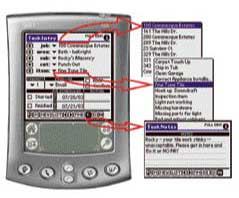
In our first review of Punch List, tech-savvy remodeling contractor Scott Shelley described an easy-to-use PDA application that helped him manage tasks and subcontractor communications for his projects. Punch List was, and still is, a typical two-part Palm OS (operating system) application. One piece installs on your desktop computer, which then synchronizes with the other piece, which is installed on one or more handheld (or “remote”) PDAs (personal digital assistants). The two pieces work together to let you cruise a job site with your PDA in hand, assigning tasks to subs, suppliers, and employees using preprogrammed (by you) drop-down lists (see Figure 1). Back at the office, a quick “hot sync” transfers all the information gathered at the job site to the desktop PC, which can then generate a stack of dunning letters (a.k.a. friendly reminders) that can be printed and mailed, or faxed directly to your subs, suppliers, and even employees — whoever is responsible for getting a particular task done. On the next visit to the job site, you can inspect all the open tasks, checking them off on your PDA if completed, or queuing them up for another round of reminders.
Figure 1.The Punch List “remote” PDA interface consists mainly of drop-down lists that you select using a stylus. Advanced users can add task notes using the Palm’s built-in handwriting system or pop-up keyboard.
Punch List can produce reports that consolidate the status of all tasks across all jobs, making it easy to see who is a good performer on your job sites and who is a hopeless slacker. In 1998, and today, Punch List perfectly leverages everything good about the Palm operating system: portability, long battery life, durability, simplicity, ease of use, and low cost. It also leverages the power of a desktop PC and the ability to print, send faxes (and now e-mail), and crunch reports.
Based on Scott Shelley’s review and the buzz that followed, I thought Punch List would take off like a rocket, but for one reason or another it didn’t. Compared to today’s models, early PDAs were underpowered; plus, the synchronization software was crude and often unreliable (either duplicating contacts or notes or vaporizing them altogether). And, of course, it took a fair amount of time and practice for users everywhere to master the finicky “Graffiti” handwriting system that was required to get information into your Palm-based PDA. The Punch List software itself was great, but the PDA platform still had a way to go before it could be part of every contractor’s toolkit.
Fast Forward
What a difference five years makes. Today’s Palm OS-based PDAs are everywhere you look. I’m surprised they’re not included in cereal boxes. You can spend less than $100 for an entry-level organizer, or, for the same money you’d have spent on a 1998-era Palm III, you can find models that successfully combine your PDA, cell phone, and even a digital camera or GPS unit into one convenient package (Figure 2).
Figure 2.Today, Punch List can run on this Handspring Treo 300, which couples a cell phone with a PDA, complete with thumb keyboard for stylus-challenged users.
Synchronization with a desktop PC or laptop has become almost a given, thanks to much better software, and there is a community of 10,000-plus developers constantly creating new PDA software and accessories. If you never did master Graffiti, you can find models that have built-in thumb keyboards for entering text or that allow you to tap on the built-in software keyboard with your stylus. The point is, PDA hardware is no longer the barrier for most builders that it was five years ago.
The residential construction industry has changed dramatically, too. The 1998 version of Punch List had only one way to electronically communicate with subcontractors — by fax. And it wasn’t hard to find subcontractors who didn’t have fax machines, rendering that method useless a good percentage of the time. Today, if Tom’s Drywall doesn’t yet have a fax machine, it’s a good bet that Tom, Tom’s wife, or their 12-year-old kid has a working e-mail address and uses it daily.
Different Strokes
Since 1998, Punch List has evolved in response to the industry. A major change is the ability to distribute dunning reminders of open tasks via e-mail as well as fax. The system not only e-mails the people responsible for tasks to remind them that something needs attention (Figure 3), but it will e-mail you a summary of all the tasks you’ve distributed as well.
Figure 3.The original version of Punch List could only send faxes. Today, though faxes are common in construction offices, e-mail is just as likely to be the medium of choice for staying in touch with subs, suppliers, and even employees.
Dan Hampton, the original developer of Punch List, recently told me that his original intent for the program was “a digital note pad.” Back in ’98, he envisioned the contractor or project manager entering all task assignments on her handheld from the field, using predefined drop-down lists. But as it turned out, Punch List is also an excellent tool for office call-takers to schedule the movement of field personnel — in response to a customer requesting warranty service, for example. Punch List makes it easy for tasks to be entered and assigned from the field, the office, or both (Figure 4).
Figure 4.The Punch List desktop is where you set up jobs, subcontractors, areas (rooms), items, and other program options, as well as distributing tasks to the various recipients by paper, fax, or e-mail. Call-takers can use the Punch List desktop to schedule tasks for field personnel — for example, in warranty service situations.
And what about builders already using electronic scheduling software like Microsoft Project or Primavera SureTrak? Nobody wants more redundant data entry, and many project tasks are created in the larger scheduling template long before a project starts. Today’s Punch List accommodates those users by sharing task data with popular scheduling programs. For example, a project created in Microsoft Project can be imported into Punch List, where data entry from the field will update activity dates for the tasks involved. The Punch Listmodified schedule can then be brought back into Project, where any changes to the critical path will be reflected.
Similarly, Punch List is now much more “aware” of other programs contractors might be using than it was in 1998. It can import contact records from popular CRM (contact or customer relations management) packages like ACT! and Outlook, and project “tasks” can be sucked in from Excel estimating spreadsheets or any other ASCII (text) source.
What’s Next
Most recently, toolmaker Bosch has taken on Punch List as the first of its “digital power tools” — technology products and services aimed at helping working contractors manage their job sites. For Punch List, the association with Bosch can only mean great things to come. For instance, the Shinn Consulting Group, long recognized by production builders as a “best practices” firm, is working with Bosch to release a Punch List add-in that will allow users to quickly create and switch between new job templates, and eventually to offer even tighter integration with popular scheduling packages. Similar associations for users of construction packages like J.D. Edwards and Intuit Master Builder, as well as generic software like QuickBooks and ACT!, are planned or already in the works, and Bosch plans to offer Punch List for other emerging mobile platforms such as Pocket PCs and Tablet PCs if enough users demand it. The Bosch deal greatly improves the chances that Punch List will become the standard we predicted it would become in 1998.
What’s Missing
So is Punch List 2003 perfect? Nope. Like any piece of software, it’s a work in progress, and there are a few things I’d like to see addressed as time goes on. For example, I’d like to see a pull-down menu of predefined notes, instead of always having to type or tap them in ad hoc. Then there’s the issue of web-enabling Punch List. Today standard e-mail serves the purpose, but with Internet access available virtually anywhere, it will be great when managers can log on to a web portal to see their open tasks, or when a sub can be alerted of an urgent task through an Instant Messenger prompt instead of e-mail. And there are still a handful of rough edges in the interface, but those are minor and no doubt under consideration.
The Bottom Line
Fact is, in 1998, Punch List was a “best of breed” application for the Palm OS, and now it’s even better. For less than $500 (including the hardware it runs on; the software starts at $299 per user), you can have a tool that will honestly improve your company’s efficiency in a measurable way. Even more important, it will improve your reputation for being a good steward of your clients’ projects, because it will be obvious to your entire team that you are serious about doing things right the first time. That in turn will translate into more referrals, a better bottom line, and less chaos. And that, as they say, is priceless.
Joe Stoddard is a technology consultant to the building industry and a contributing editor at The Journal of Light Construction . You can reach him at [email protected].