By Todd Wacome
I build million-dollar-and-up custom homes for very demanding clients in the Andover, Mass. (Boston) area. Working successfully at that level requires excellent communication and a fair amount of handholding with everyone involved in a project. Ever since I took over the business from my dad in the mid 1980s, I’ve believed technology could help my business succeed, and I’ve looked for ways I could use computers to make my business better.
When the Internet came along in the mid-nineties, I was fascinated by how all kinds of information could be published online and then retrieved by anyone with a personal computer and web browser software. Since my clients are often executives who could be in Boston today and Los Angeles tomorrow, my first thought was to use the Internet to put basic project information where everyone could see it 24-7. By 1998 our www.wynwood.net website had become “mission control” for our projects, and all our other job-site and office technology is now geared around how we use the Internet.
No-Network Networking
My computer setup is somewhat unconventional. In my office I have five workstations but only one actual computer. It’s rare that my office manager and I would need to be working on the computer at the same time, so instead of building a complicated network, we use a “CPU sharing device,” which allows me to connect multiple monitors, keyboards, and mice in different offices to a single computer. The office computer runs our BuildSoft accounting system, SoftPlan CAD, the two database programs (discussed below) that make up our project management system, all our project documents, and a local (unpublished) copy of our website.
I also have a Sharp Actius UM-20 ultra-light notebook computer equipped with a wireless cellular modem (see Figure 1). I’m surprised more builders haven’t caught on to the Sharp laptop; it’s a remarkable computer for anyone on the go. At 9×11 inches it’s no bigger than a typical spiral-bound paper notebook. It weighs only three pounds yet has as much power as most desktop computers.
The Sharp UM series sub-3-pound laptop, equipped with a wireless cellular modem, is the author’s constant companion. It’s light enough to hold in one hand while typing with the other yet has a 12-inch screen that’s acceptable for CAD.
The tiny size of the Sharp (www.sharp-usa.com) makes it easy to carry with me all the time, and the wireless modem lets me connect to the Internet to upload digital photos and other files to my website, or to receive and respond to key faxes and other documents, no matter where I happen to be. I’ve looked at the current crop of PDAs (personal digital assistants) and other hand-held gadgets, and they all have severe limitations compared with my laptop.
The third leg of our “no-network network” is the Internet. In addition to hosting our website, we use the Internet like a giant “floppy disk in the sky” — to back up our critical files and keep our project files up to date between the field and the office. To do that, we “push” files to the Internet for storage and for viewing online, and then “fetch” them back to our office and mobile computers. That way, everything stays in sync.
Batch Job
Like most builders, I found the jargon of the Internet — packets, connections, protocols, TCP/IP — to be overwhelming at first. But in order to make use of the Internet for project management and file storage, I had to force myself to learn some of the nuts and bolts of getting files from my computers to our web-hosting provider. I learned that “FTP” (file transfer protocol) is the most common means of doing that. A web browser can be used to transfer files by FTP, but it’s almost impossible to automate. You can also buy separate programs like CuteFTP (www.cuteftp.com) and WS_FTP (www.ipswitch.com), which web designers and network administrators might use. Those are powerful programs and can be automated, but they also mean a new piece of software for somebody to learn, and we’re too busy for that.
As it turned out, everything we need to push and fetch files via FTP is built right in to the Windows operating system. FTP commands look a lot like old DOS commands and can be run from a DOS window or be incorporated into a “batch file.” I was using computers back in the days of DOS, so I’m comfortable writing DOS batch files to automate different computing chores. A batch file is a special text file that will run a listing of computer commands one after the other, saving you the hassle of typing each one in individually (Figure 2). Better yet, after creating the batch file, you can drag a shortcut to the Windows desktop that will run it by simply double-clicking. It’s easy to do, and it’s free.
Figure 2.Uploading files to your web-hosting account can be managed with a few mouse clicks by creating simple batch files that automate the FTP process. This file connects to the Internet and then uploads a set of documents to the author’s website. An FTP ttutorial is available online at http://www.mountainconsulting.com/wacome/.
In our case, I’ve created several batch files to automate the tasks of pushing and fetching files to and from our web-hosting service, and I’ve made desktop shortcuts on both our office computer and my laptop. So now, all my office manager has to do to upload a new set of project documents or update our web pages is double-click a shortcut icon on her computer desktop. She doesn’t need to know about FTP, TCP/IP, or any other technical mumbo-jumbo.
Website 101
Each time we start a new job, I set up a folder structure for it on our website using templates I created using a discontinued web page editor called AOLpress (still available for download from www.daviestrek.com/software/aolpress/). Because the bulk of the work is done ahead of time, it takes me only a couple of hours to set up an entire job online.
The pages created with AOLpress serve the purpose, but they’re not slick by today’s standards. If I was going to do it over today, I’d probably use a commercial web-authoring tool like Microsoft FrontPage or Macromedia DreamWeaver.
The initial version of our website was just the usual static information, but I knew that to make it work as a project management tool I needed a way to upload the journal notes and other changeable content. The solution turned out to be two old DOS database programs I’ve been using since 1988. I use Symantec Q&A to manage project details and change orders, and Lotus Agenda, a basic contact manager, to log journal notes.
Almost by accident I discovered that all you have to do to turn any text file into a web page is to add an “html” (hyper-text markup language) tag to the beginning of the file, and “/html” at the end. That’s when a light bulb went off — my old DOS database programs could “sort” on certain fields and generate a report, so why not make the html tags a field and let the database tack them on to the report automatically? I almost fell out of my chair when I figured that out — now my office manager and I could turn our existing databases into basic web pages with just a couple of commands.
Internet “Paper”
I had good office and project systems in place before the Internet came along, but back then we had to print out (and distribute) reams of paper to keep everyone on the same page. If there is one thing builders should take home from this article, it’s that the Internet can be a replacement for almost anything you now print out on paper. The great advantage is that everyone who needs the information can get it at the same time, with no postage or courier expense and no delays. All anyone needs is an Internet connection and a web browser, which just about everyone has nowadays.
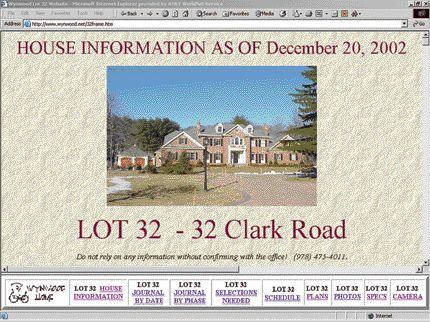
At first, I thought the only documents I could put online were html web pages, but as time has gone on, I’ve figured out ways to get almost any kind of document uploaded to our website, even paper building permits, plot plans, and invoices (Figure 3). Some documents (for example, a project specification) are put on our public website, where they can be viewed by anyone, while others (like a time card or an invoice) have hidden locations to keep them more private.
Figure 3.Each section of the “house information” is linked to the actual project document that can be viewed online. Here a scanned version of the building permit created with an HP K80 multifunction fax-scanner-printer is shown.
Paper documents. We use an HP (Hewlett-Packard) K80 multifunction printer-fax-scanner with a sheet feeder to convert paper documents — building permits, subcontractor invoices, and photographs — into digital files that can be uploaded to our website or simply stored on our computers (Figure 4). When paper mail comes in, our office manager marks what needs to be scanned and preps it by removing staples and paper clips. Once a week or so the earmarked paper documents are scanned and the electronic versions are placed in a folder on our office computer. Some are then marked for specific projects and moved to the folders that are uploaded to our website.
Figure 4.Where there’s a will there’s a way. Almost any kind of document can be put online once it’s converted to the correct file format. Paper documents like invoices and tax maps (left) are scanned with multifunction printer-fax-scanner and saved as .tif files. CAD files can be saved as .jpg or .gif images or .pdf files (center), and still other programs like BuildSoft and Microsoft Office can save files in an html format that can be uploaded directly (right).
We normally save the electronic version as a .tif (tagged image format) file. The .tif format makes a small file that can be easily uploaded and viewed in most web browsers, and it’s also the file format generated by electronic fax services like eFax (www.efax.com). Adobe .pdf (portable document format) is another good choice for scanned paper documents. While we don’t use it as much, I’m thinking about heading in that direction because it’s such a popular format.
Scanning especially makes sense for documents that are physically cumbersome: old fragile drawings, bulky books of tax maps, and so forth. Instead of trying to scan those in-house, we pay a reprographics house with specialized equipment to do it. For instance, it cost me around $100 to get a book of tax maps scanned and burned onto a CD that I can view on my laptop. Now, if I want to research a tax map or check out a specific lot while I’m driving around, I can do it without having to pull over and fumble through a huge bound book of maps.
BuildSoft schedules and reports. We use BuildSoft (www.homesphere.com) for basic accounting and job scheduling. Luckily, the program can generate some html files automatically. The schedule at right in Figure 4 came directly out of BuildSoft with no tweaking required. BuildSoft can’t generate every report we need by itself, so we supplement it with Crystal reports (third-party report-writing software that extends the reach of certain other programs), which can also generate html files automatically.
Proposals and specifications. Our proposal form is an html page that I uilt from scratch. I do all proposals strictly online, and the advantages are so huge that I will never do a conventional paper proposal again. If I make a mistake on an online copy, I can change it without worrying about an obsolete paper copy kicking around, and online proposals leave no written trail of your pricing or practices for your competitors to use against you. I can’t stop prospects from printing out their in-process proposal from the web, but it won’t have my signature or any other “official” information on it until they’re actually ready to approve the deal.
Drawings. I’m not a big fan of putting our complete designs online, but if we need to for some reason, we’ll do it. The way we handle converting CAD files depends on the type of drawing. For single-room floor plans, details, and 3D work, we use the built-in features in SoftPlan that will create an uploadable .gif or .jpg image file. Because of their size, full floor plans are a little trickier. With SoftPlan files, the best way I’ve found is to “print” the drawing as a .pdf file, which can then be uploaded. The most versatile .pdf “writer” is Adobe Acrobat, which costs around $200. A lower-cost (and lower-featured) alternative is Pdf995 ( www.pdf995.com), which installs like any printer driver and, as the name suggests, costs only $9.95. If you’re using AutoCAD or AutoCAD-compatible .dwg or .dxf format files, they can be uploaded directly, but your users will need the free Volo View browser plug-in to view them ( www.autodesk.com).