For its first several years of business, when my remodeling company did only one job at a time, I was able to keep all relevant business data in my head. I could remember which materials had been ordered and which hadn’t. And when an invoice came in from a sub or supplier, I immediately knew if the amount was right or wrong.
But about six years ago we started doing multiple projects, and it wasn’t long before there were more details than I could personally keep track of. At that time, I still placed the material orders for all jobs. If a crew ran short of materials, I’d run out and buy the missing item so everyone could keep working. But when it got to the point where I was making runs to the lumberyard almost every day, I knew something had to change.
My first response was to make lead carpenters responsible for ordering missing items. This approach was only partially successful. With my leads — rather than me — running to the lumberyard, I had more time to devote to estimating jobs and operating the business. However, when the lead left the job site, there was no one there to run the job. In addition, it was a terrible waste to spend $75 of carpentry labor to pick up $30 worth of studs. And my leads, like most carpenters, were not big on paperwork. When bills arrived at the end of the month, I had a hard time matching purchases with the proper jobs and tasks.
Ultimately, we solved these and other problems by instituting a purchase-order system.
What Is a Purchase Order?
A purchase order — or PO — is a contract that records the terms and details of an agreement to purchase material or labor from a supplier or sub. The main feature of a PO system is that the PO is written and entered in the books at the moment the purchase decision is made.
Why use a PO system? A purchase-order system offers a building company many benefits. First, POs can help you control costs by providing real-time spending data that is coded to the correct budget category. This makes it easier to do accurate job-costing, allowing future estimates to be based on real numbers, not guesses.
POs also make it easier to manage cash flow. Requiring vendors to price invoices right away means you’ll know in advance what each vendor is going to bill you for at the end of the month. POs can improve cash flow, too. On time-and-materials (T&M) projects, POs make it possible to bill customers earlier so you can run the project with their cash, not yours.
Finally, POs can help with logistics and scheduling. If you write all the POs for a job up-front, they can serve as a road map for how to schedule deliveries and organize the job.
Who can it help? A PO system will work with any size company. It may not be worthwhile if you’re a one-man shop doing one job at a time, but using POs has been very beneficial to me as my company has grown. We’re now doing about $800,000 of business per year with a staff that consists of me, a part-time office person, and two to three lead carpenters at any one time.
Accounting software. Many accounting programs can generate and manage purchase orders. The examples in this story come from QuickBooks Pro, the program we use. Accounting software can make it easier to run a PO system, but you could also run a simple version with pencil and paper. The important thing is to have a system for creating a job budget and tracking spending against it.
Even if all you track is who ordered what, how much it cost, and when it was received, you’ll be well down the road toward gaining control of costs.
Tracking Purchases by Site Personnel
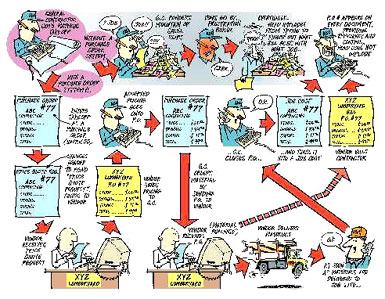
Since we thought it would be disruptive to institute a full-blown PO system all at once, we introduced it one step at a time. Our first priority was to track day-to-day purchases by our leads, so we updated our supplier agreements to require a job name and PO number on every purchase.
PO number required. Under the new system, if the lead wants to buy something, he first has to call the office to get a PO number. Before we give it to him, he has to tell us the first few items he’s going to buy and what job and task they are for. That way, if there’s a foul-up — say, the PO number gets transposed — we can identify the transaction by the first few items bought. As long as it’s unique to that purchase, the actual PO number can be anything; our accounting program assigns numbers sequentially.
When the lead gets to the sales counter, he gives the PO number to the salesperson, who puts it on the sales slip. The same PO number appears later on the bill that comes to us. The lead asks the salesperson to immediately price out the slip. We require leads to fax the sales slips to the office once a day. If the lead orders by phone, we ask the supplier to fax a priced-out copy of the sales slip to our office by the end of the day.
Back at the office. The purpose of the PO is to track a particular purchase, so there’s no need to write separate POs for different budget categories. When a sales slip comes into the office, we code each line item to the correct budget category and enter it in the books. It’s no different than what we’d do without a PO system; we’re just doing it early instead of waiting till the end of the month. This allows us to run a report and see how much we owe our vendors at any point. Also, with PO numbers assigned to each purchase, it’s much easier to sort things out when invoices arrive.
The PO exists electronically, but we also print out hard copies for the lead carpenter’s field notebook and to back up our computer data. Using PO numbers ensures that only authorized purchases are made on our accounts. I suppose someone could make up a fake PO number, but the fabrication would be obvious once the bill came in.
Creating a Framework for the Job
The next step in our company’s development of the system was to start writing POs for the entire job before the project began. Since I have to do takeoffs anyway, I now use that time to decide which items need to be delivered at the same time, and group those items on the same PO. The POs contain enough detail that, when it’s time to order, we can send them to vendors and get the materials we want. To avoid having everything show up at the same time, I write more than one PO per supplier. For example, on a cramped job site, I might split the lumber order into separate POs for the floor, wall, and roof drops.
Lock in pricing. To request pricing, I print out POs with the header changed to “Price Quote Request” and send them to the vendors. Because the header is just a template, it’s easy to change. When a price comes in, we record it on the PO. Later, when we order that material, we send the same PO back to the vendor; it indicates what we want and how much the vendor agreed to sell it for.
Helping Lead Carpenters Do Better
Once the new PO system was in place, the lead carpenters began ordering all their own materials. Typically, the process works like this: At the beginning of each job, I give the lead carpenter copies of the POs I wrote when I did the takeoff. When it’s time to order material, the lead sends the appropriate PO to the vendor. Our company policy is that these are the materials the lead has to work with on this job. If he thinks the quantities are wrong, he needs to tell me right away. I expect the lead to hit the budget and I don’t want him using an estimating or takeoff error as an excuse for going over.