Our remodeling company produces between 70 and 100 projects a year, from handyman work to whole-house remodels. We used to have a hard time scheduling that many jobs, but over the last two years we’ve developed a system that brings some harmony to the process.
There are all kinds of computer programs for scheduling jobs. Our company already uses some very sophisticated software for bookkeeping and job costing, but we do our scheduling with dry-erase markers. The dry-erase boards cover one entire wall of our production manager’s office. We prefer this manual system because it’s easier to administer than a computer program and it puts the information where everyone, including staffers who don’t use computers, can see it.
Instead of using the standard-size dry-erase boards from office-supply stores, we make our boards from 4×8 sheets of Masonite — the kind that comes prefinished with a smooth white surface. The sheets cost about $15 each. We cut them to size, hang them on the wall, and run strips of tape across them to create the same kind of grid you would find on an Excel spreadsheet. The tape allows us to erase the contents of the “cells” without erasing the grid.
We use four categories of boards: job boards, lead boards, a long-term outlook board, and a board for future projects. Some are attached to a particular spot on the wall, but most are held in place by Z-shaped aluminum channels, which makes it easy to remove and rearrange the boards.
Job Boards
The job board consists of one job information “sheet” and 10 weekly calendar “sheets.” The job information sheet is 48 inches tall and about 16 inches wide. The calendar sheets are 48 inches tall and about 8 inches wide. All together, they take up a 4-by-8-foot space on the wall.
The boards are divided into columns and rows. Each row contains the schedule for a single job. We do a lot of jobs at one time, so to be on the safe side we made 20 rows. The job information sheet has columns for the name of the lead carpenter, the job number, and the name of the homeowner. The calendar sheets represent weeks and are divided into five columns, one for each workday.
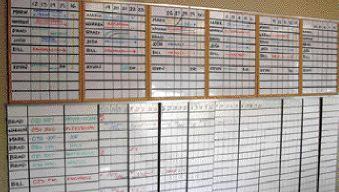
Tasks are scheduled a week at a time across the calendar sheets (see Figure 1). Every week, one of the boards becomes out-of-date because it represents the previous week. If the schedule were written on a single giant grid, the only way to update it would be to erase and rewrite 10 weeks’ worth of information. But because we cut the board into pieces, we can pull last week’s board from the channels and slide the other boards to the left. The old board is then erased and inserted on the right, where it becomes week No. 10. This allows us to schedule active jobs 10 weeks out.
Figure 1. The framed boards on top show where each carpenter will be for the next six weeks. The boards on the bottom show what will be happening on each job for the next 10 weeks.
Lead Boards
Just above the job boards there are six moveable lead boards, each representing a single week. Each board is divided into six columns. The first column lists all of our carpenters; the other five are for the days of the week. We use the lead boards to list which job individual crew members will be on each day for the next six weeks. Our crews work a four-day week, so Friday is usually blank.
As with the calendar sheets, one of the lead boards becomes out-of-date each week, so we pull the board that’s obsolete, slide the remaining boards to the left, and insert the old board on the right, where it becomes week No. 6.
Long-Term Outlook
The long-term outlook board contains a list of lead carpenters. It shows how far out we have them scheduled based on all the jobs that have been sold. We can determine when they will be free by looking at the job board, but we list the information here because it’s more convenient to have it in a single, easy-to-find location.
When it’s time to schedule a new job, we can go to the long-term outlook board and see when the next lead carpenter will be available. We update the information on a regular basis so we can push jobs forward or backward depending on when personnel will be available.
Future Projects
The last board contains a list of future projects. On the left-hand side is a list of jobs that have been sold but not scheduled. Once we schedule a job, it’s erased from this list and written on the job boards. The right side of this board contains a list of projects we expect to sign contracts for in the near future (Figure 2). If the board is filled, we know there’s a lot of work in the pipeline. If there are too many empty spaces, it tells the members of the sales department they need to sell more jobs.
Figure 2. The upper portion of this board shows when lead carpenters will be available to start new projects. The lower portion shows jobs that have been sold but not scheduled and jobs that are likely to sell in the near future.
Managing the Schedule
Once a week the production manager updates the job and lead boards based on changes that occurred the previous week. At the same time, the sales department puts together a list of jobs that have a high probability of selling in the next few weeks. Then, the production managers and sales department sit down with the owners to have a “felt-board” meeting. We use this meeting to confirm the current schedule and look at upcoming projects.
This process makes it easier to finish jobs on time because it prevents us from agreeing to start projects before crew members will actually be available to work on them. We can tell at a glance whether a slowdown is coming or whether there’s so much work that we need to get some extra help. It also makes it easier to identify gaps in the schedule where we can fit in small jobs.
It took some time to get this system up and running, but it was worth every dime of overhead. The beauty of the system is that all of the information is up on the wall where everyone in the company can see it. It’s a whole lot easier than looking things up on a computer screen. When employees come to the office they can see where they will be working for the next six weeks and confirm that the schedule for their current job is accurate. If it’s not, we can make the necessary adjustments.
I knew this system was working when I went into the production manager’s office and found our tile subcontractor studying the schedule. I asked him what he was doing and he replied, “Just seeing when you need me so I won’t overbook myself.” Cory Eckert is a project developer for the Artisans Group, an Olympia, Wash., remodeling company. He has been in residential construction for the last 16 years.