by Steve Greenberg
Short of dragging prospective clients to your job sites,
photography is the only way you're going to be able to show
them examples of your work. But dim, blurry, poorly composed
images aren't likely to impress anyone. Fortunately, while
there may be some special projects where it pays to hire a pro,
taking your own high-quality architectural photographs isn't
difficult.
The key to getting great photos is your digital camera.
Although you could easily spend an arm and a leg on a
pro-quality digital SLR (single-lens reflex) camera and the
lenses and lighting to go with it, you can also get decent
results with a consumer-level camera that costs less than $300
(see sidebar, page 8). In this article, I'll give you tips on
how to compose your photographs and use improvised lighting and
various combinations of filters to show off your projects in
the best possible light.
Before thinking about getting those perfect "finish" shots,
though, remember to get the "before" photos. These pictures
don't need to be great, since bad ones will make your site look
as if it really needed a makeover — and help your "after"
shots look even better. Documenting every wall, floor, and
ceiling in a remodeling project is good practice anyway, for
insurance purposes; when the client says, "That scratch wasn't
in my floor before you showed up," you have proof that it
was.
Composition
To get an idea of what makes a good architectural photograph,
take a look at a few "house beautiful" magazines with
professional photography in them. Where is the photographer
shooting from, and why? What information was the photo meant to
convey?
As you frame up your own shots, keep the following basic rules
of composition in mind. They'll help your photos look more
interesting.
• Rule of thirds. Never divide your shot
into two equal parts, horizontally or vertically; instead,
divide it into thirds (see Figure 1). Frame your photos with
the horizon on either the upper one-third line or the lower
two-thirds line, not square in the middle. Depending on which
line you choose, the photo will emphasize either the sky or the
ground.
Figure 1. When the subject is placed in
the middle of the frame, the photo feels one-dimensional and
lacks movement (top left). To improve the composition, move the
subject to one of the targeting points created when a
tic-tac-toe grid is superimposed on your viewfinder (top
right). In the photo below, the diagonal line created by the
two workers leads the eye into the shot and creates interest.
Placing the horizon in the upper third of the frame helps
emphasize the site work rather than the building
itself.
• Lead the eye. The easiest way to kill a good photo is to
have the viewer's eye stop dead and not know where to go. Give
the eye a path that leads through the picture by moving your
camera away from the center axis of the room or building.
Instead of shooting straight ahead, shoot from a corner, or a
bit off-center, creating imaginary lines that lead the eye into
the shot. The eye will follow other paths, too: small to large,
large to small, up to down, and down to up.
• Tic-tac-toe. Rather than using the center circle in the
viewfinder as a targeting device, take an imaginary pen and
divide your viewfinder evenly with two horizontal and two
vertical lines (so that the viewfinder resembles a tic-tac-toe
board). Your targeting points are now where the vertical and
horizontal lines intersect. When you place the subject at one
of those intersecting lines, the shot is more interesting and
has some "motion" to it.
• Balance/counterbalance. Two objects in a photograph that
are the same size will confuse the viewer. For example, instead
of leaving two flower arrangements on a countertop, remove a
flower from one vase and place it on the counter near the
second vase; that creates a more pleasing and counterbalanced
image. Variations on this theme include using lighter and
darker objects, or even objects that are nearer and farther
away from the camera.
• Watch your background. Leaving a tool or a piece of
photography equipment on a counter way in the back of your shot
is going to kill the photo and show your lack of attention to
detail. Take the time to close doors, remove construction
equipment, and tidy up the shot.
Lighting
In most cases, you'll need to supplement your room's existing
natural and artificial lighting, which can be done with a few
simple techniques. First, though, plan on turning off or taping
over the built-in flash mounted on your camera. A flash's light
is not only inadequate to fill a room — it's too direct
and harsh. Moreover, visualizing what the lighting will look
like is too difficult when using a flash, which is why I like
to use constant-source — or nonflash —
lighting.
In addition, plan on using your camera's automatic settings.
Experienced photographers may want to set the shutter speed and
lens aperture manually, but a discussion of this topic is
outside the scope of this article. By using the combination of
constant source lighting described here and your camera's
automatic settings, you should be able to get excellent
results.
Equipment. All of the constant-source lights used in
photography have tungsten filaments inside their bulbs; so do
common and inexpensive 500- to 1,000-watt rectangular work
lights. If you own some of these, you already have some —
if not most — of the lighting you'll need (Figure
2).
Figure 2. While professional light kits
offer greater control and more features, basic work lights are
an inexpensive and readily available light source for job-site
photography. To soften shadows, bounce light off a reflective
surface, such as a ceiling (top), or use heat-resistant
spun-fiberglass diffusion material, which can be safely draped
over hot work lights (bottom photos).
Of course, there are some good reasons to purchase a
professional light kit. Pro lights are designed to be moved
around, and you can reposition their lamp heads while they're
turned on without getting burned. Many can be focused to throw
either a narrow beam or a wide spread of light. They also have
the advantage of accepting attachments like barn doors, which
allow you to shade or block of some of the light you're
casting. This can come in handy when your lights are positioned
too close to something, or when you want to shade an area of
the photo.
Another inexpensive option — typically less than $25 each
— is to buy a few photo flood reflectors. The most basic
versions are made of polished aluminum; they're often equipped
with spring-clamp mounts (or can be mounted on a stand) and
accept different types of lamps for different lighting
conditions.
Several other pieces of equipment can come in handy, too, such
as stands to hold up the lights and diffusion material to
scatter light and soften shadows. Different types of diffusion
material are available, including woven polyester and spun
fiberglass. Each has its own distinctive properties, but
whichever material you choose, make sure it won't melt or catch
fire if it comes in contact with hot lights. A
4-foot-by-25-foot roll of Tough Rolux #3000 diffusion material
(Rosco, 800/767-2669, www.rosco.com) costs about $150.
You'll also need a few heavy extension cords. I prefer the
yellow ones because they're easy to see.
Direct vs. indirect lighting. Pointing lights directly
at an area throws the most light, but it can also produce harsh
shadows, especially if the lamps are close to what you're
shooting. I generally use direct light only when an area is
deep in shadow or when I need to open it up a bit to emphasize
it. To soften the shadows, I put diffusion material on the
lights.
Bouncing the light off a wall or ceiling instead of shining it
directly produces better, shadow-free lighting. Keep in mind
that light bounced off a colored surface — like a painted
wall — will cast that color into your shot. Another
option is to reflect the light off a large white card, such as
foam core or a white board. Although you'll lose about half
your light's output by bouncing it, the results will be much
more natural-looking.
Figure 3. To match the 5,500 K color
temperature of daylight, the author adds blue CTB conversion
filters to his light sources (left). Then he experiments,
strategically placing lights — such as this filtered and
diffused pro light located in a hallway off the kitchen (right)
— to achieve even, natural lighting.
The color of light. Color temperature — measured
in degrees Kelvin — varies depending on the light source.
For example, an incandescent light bulb has a "warmer" yellow
color temperature of about 2,800 K, while sunlight at noon has
a "cooler" blue color temperature of 5,500 K. When these
different light sources are mixed together, your brain may be
able to even out the color imbalances, but your camera can't.
It will automatically decide that the interior walls (the
majority of the shot) are "normal," or white, which means that
the light outside the windows will appear to be 2,700 K bluer
(5,500 - 2,800 = 2,700) in the resulting photo.
One way to address this problem is to swap the bulbs in your
lights to daylight bulbs. Sold online and in photo stores,
4,800 K to 5,500 K bulbs are blue in color and are rated at up
to 500 watts; they cost about $5 each. I often use General
Electric's BCA lamps (available through B&H Photo,
800/606-6969, www.bhphotovideo.com).
Another way to balance the color of your lighting is to use
conversion filters. CTB (color temperature blue) filters will
make regular 3,200 K incandescent lamps look blue, effectively
turning them into 5,500 K sources that will match the exterior
lighting (Figure 3). These filters are made of different
materials, including polyester and acetate (commonly known as
theater gels); once again, no matter which one you use, make
sure it's a hot-light-rated filter material that won't melt or
catch fire.
CTO (color temperature orange) filters are used to "warm up"
daylight so that it matches 3,200 K incandescent lights;
they're usually applied to the outside of the windows. Because
they reduce the output of your light source, you have to
compensate for them by either adding more lights or increasing
your exposure times.
Light intensity. Daylight coming in through windows is
usually brighter than the lighting you supply. Rather than
adding more lights (which tend to get hot), you can reduce the
intensity of the daylight by putting screens in the windows, or
even tacking up extra screens on the exterior. Another option
is to cover the windows (usually on the exterior) with
neutral-density filter material. I carry Rosco's Cinegel #3402
N.3 (one f/stop) and #3404 N.9 (three f/stops) with me,
combining the two as needed to get the proper amount of light
reduction. (In photography, each f/stop equals a 50 percent
reduction in light level, so that an N.3 filter allows 50
percent of light through and an N.6 filter allows 25 percent of
light to pass through). The material comes in
20-inch-by-24-inch sheets and in 57-inch-by-21-foot rolls in
various opacities.
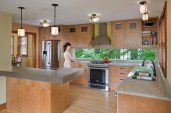
An effective lighting plan balances a room's existing
lighting with additional sources that fill in dark areas while
avoiding unnatural shadows.
Setting Up the Camera and
Lights
When setting up your camera, make sure to level it, using
either your tripod's bubble level (if it has one) or a
carpenter's level. I often position the camera to shoot at a
slight down angle, so getting the camera plumb can be tricky.
Occasionally it's possible to align one side of the frame with
a vertical element, such as a door jamb or window casing, but
this can result in too much distortion on the opposite side of
the frame. I prefer to put a little error on both sides of the
frame to even things out.
To avoid nasty reflections from windows and other shiny
surfaces, I frame up shots (keeping in mind the compositional
elements noted above) before placing my lights. This makes it
easy to see hot spots through the viewfinder.
When changing camera position, it's often necessary to adjust
the position of the lights as well. To make setting up the
lights easier, pros sometimes cheat by using Krylon Dulling
Spray (800/457-9566, www.krylon.com) on reflective surfaces
(don't use hairspray, which is a lacquer and can damage the
finish).
A good way to determine where additional light is needed is to
first shoot the room using available light (see sidebar, next
page). As I place my lights (for locations, see floor plan,
above), I like to follow the lighting that's been established
in the room by the lighting designer or architect (or even by
the electrician). For example, if the lighting is configured to
be moody, I try to mimic that ambience. If the room is bright
and airy, like the kitchen shown in this article, I try to make
my lighting full and even. My goal is to avoid adding too much
light to the shot, which would make the room seem unnatural or
the windows dark.
By the way, this isn't necessarily a fast process. It takes
years of practice to light a room quickly, so plan on spending
a day, if necessary, to get the lighting right. Be patient and
don't be afraid to move your lights around and experiment.
Since you're shooting digitally, the only cost will be your
time.
Key light. The main — or "key" — lighting
for most shots typically comes from behind the camera, and at a
slight angle. On this shoot, I used a double 500-watt work
light and a 1,000-watt pro light, for a total of 2,000 watts of
key lighting (Lights A and B on the floor plan, previous page).
To minimize shadows, I bounced the light off the ceiling, and
while I didn't use any diffusion material, I was careful to
place the lights so that harsh shadows didn't fall in the
foreground, especially on the chairs.
Setting Up a Shot
Once the shot has been framed, I always double-check to
make sure that carpentry tools, photo equipment, and
other distractions — such as the open garage door
visible through the window in this shot — have
been removed (1). To determine how much extra lighting
will be needed, I start by shooting with available
light only (2). I shot this kitchen on an overcast day,
which made it easier to balance the natural light with
additional lighting.
Next, to brighten the foreground without casting harsh
shadows across the chairs, I placed key lighting behind
the camera and bounced its light off the ceiling (3).
Positioned just outside the room in the hall, another
light opened up the middle part of the kitchen (4). And
to light the back of the room, I put a 500-watt work
light in a closet (5), with diffusion material layered
over the lamp.
In the final shot, all of the natural and artificial
light sources work together to create a natural-looking
image free of harsh shadows and distracting reflections
(6). 1. Frame the shot 2. Check natural light 3. Add foreground lighting 4. Add side lighting 5. Add background lighting 6. Finished shot |
What Kind of Camera Should You
Buy?
I used a Nikon Coolpix 4500 4-megapixel camera to take
the shots in this article. It's no longer made, but I
recommend any similar split-body camera because it can
be held over the head (or at a very low angle) and
twisted so that its back LCD screen is still viewable
(see photo). Whatever you decide to buy — a
digital SLR or a less-expensive point-and-shoot camera
— here are the features to consider: Resolution. The size of the digital
film chip in your camera is not as important as you
might think. While newer cameras boast 6- and
7-megapixel chips — which are big enough to
produce high-resolution prints of 8x10 or bigger
— 4 to 5 megapixels are more than enough for
smaller photos or for Web-site use. This means you can
buy last year's camera or a used one and still have
more than enough detail in your shots. Viewing system. Don't buy a camera
that doesn't have an eyepiece, because using a mini-LCD
screen as a primary viewing device is very difficult,
especially when the site has a lot of extraneous light.
Also, look for a large LCD display, which makes it
easier to view and review your shot. If you can get a
clear view of the shot you just took when you test out
the camera in the store, odds are it will be okay on
the job site. Storage cards. Most cameras use either
CF (compact flash) or SD (secure digital) cards to
store digital information; in my experience, CF cards
are sturdier and harder to damage. While card memory
and costs vary, I recommend high-speed cards, which
decrease the time needed between shots. Controls. Some cameras have dedicated
software controls for such features as review/delete,
flash, and white balance; on other cameras with fewer
controls, you have to dig through layers of menu
options to get to the function you want. Size. On a job site, smaller isn't
necessarily better — your camera should fit
comfortably in your hand and balance well. Extras. Be sure your camera has a
tripod mount. And buy a good case: I like the
waterproof, dirt-proof, crew-proof hardened plastic
ones made by Pelican (800/
882-4730, www.casesbypelican.com), which come in a
number of sizes and configurations. |
At your own photo shoots, remember to spread out your
electrical sources, and try to use the home's 20-amp circuits;
otherwise, you'll be running back and forth to the circuit
panel a lot. It's also a good idea to disable smoke detectors,
since a whiff of smoke from your lights (burning gels or dust)
can set them off. And keep some first-aid cream handy: It's
easy to get burned moving those hot lights around.
Fill lights. For additional lighting, I took advantage
of an open doorway leading into the room (Light C, floor plan)
and a utility closet (Light D, floor plan).
Positioned just outside the room in the hall, Light C was a
1,000-watt pro light on a stand; it was covered with diffusion
material and a Rosco Full Blue CTB #3202 gel tungsten
conversion filter. To avoid overlighting the shiny ovens, I
moved the light around a bit so that the door opening cast a
shadow on them.
Placed on the floor in the closet, Light D — a 500-watt
halogen work light — helped open up the back of the room.
I also positioned another 1,000-watt work light (Light E, floor
plan) on the floor in front of the island return. This light
helped open up the area in front of the sink and filled in the
shadows thrown by Light D in the closet.
Finally, to balance the daylight and help correct the incoming
light to match my tungsten sources and interior tungsten
lights, I took advantage of being on the ground floor and
covered the windows from the outside with large rolls of 1/4
CTO filters (which convert 5,500 K daylight to 4,500 K). I did
this even though I'd left in the window screens to help cut
down the light and had used full CTB filters on my light
sources; it allowed me to warm up the daylight even more.
As I frame up my shots, I always try to shoot a bit loose (I
can crop the pictures later). That way, I don't have to worry
about hiding every light. Also, with most midrange camera
lenses, the edges of the shot are not all that sharp and they
tend to have the most distortion. Plus I find it hard to bend
my eye into the edges of the viewfinder (especially since I
wear glasses), so I occasionally miss things on the
periphery.
There's Always Photoshop
I bring a laptop computer to photo shoots so that I can check
my images as I take them. If I've made a technical mistake,
it's better to know about it while my equipment is still set up
and I'm on site.
Later on, I'll open up the images using Adobe Photoshop
software and do some spot color correction, retouching, and
cropping. Most new cameras come with basic editing software
that allows you to adjust brightness, contrast, and color
balance; crop and resize the image; and perform other editing
tasks.
Photoshop — which comes in several versions with varying
levels of tools and cost — offers even more editing
options.
Steve Greenberg is a professional photographer and the
estimating coordinator at Byggmeister, a design-build
remodeling firm in Newton, Mass.